Table of contents
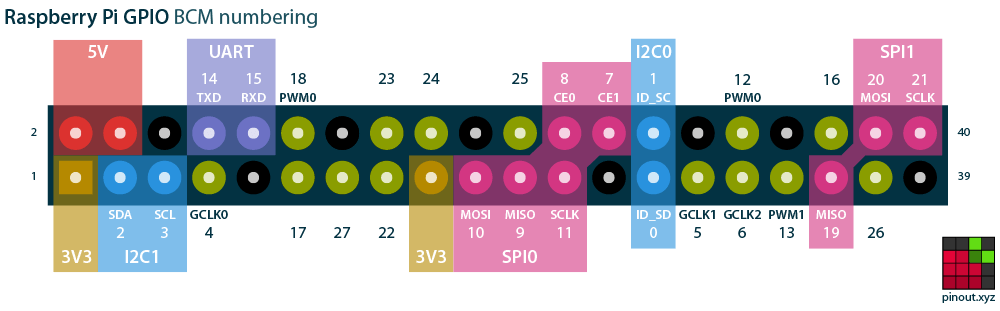
(Feature image from Raspberry Pi Pinout)
Hardware Resources
References:
-
Raspberry Pi hardware - Raspberry Pi Documentation
- Searched by s3
Notes:
-
Overview

SPI
References:
-
树莓派(主)与STM32(从)使用SPI通信 - CSDN博客
- Searched by
树莓派 SPI 实验in DDG
- Searched by
-
树莓派 wiringPi 用户手册 - 小鹏STEM
- Searched by
树莓派 3B SPI 实验in DDG
- Searched by
-
Raspberry Pi Pinout Guide: How to use the Raspberry Pi GPIOs? - RNT
- Searched by
raspberry pi 3B enable gpioin DDG
- Searched by
- 树莓派3B+ SPI Flash编程器 - 佐须之男的博客 - forgotfun.org
-
- Searched by
- Searched by
Notes:
-
System info:
- Board: Raspberry Pi 3B
- OS: Ubuntu Server 24.10
- Use ssh to connect the Raspberry Pi
-
Enable SPI interface (r1-CSDN)
1
2
sudo apt-get install raspi-config sudo raspi-config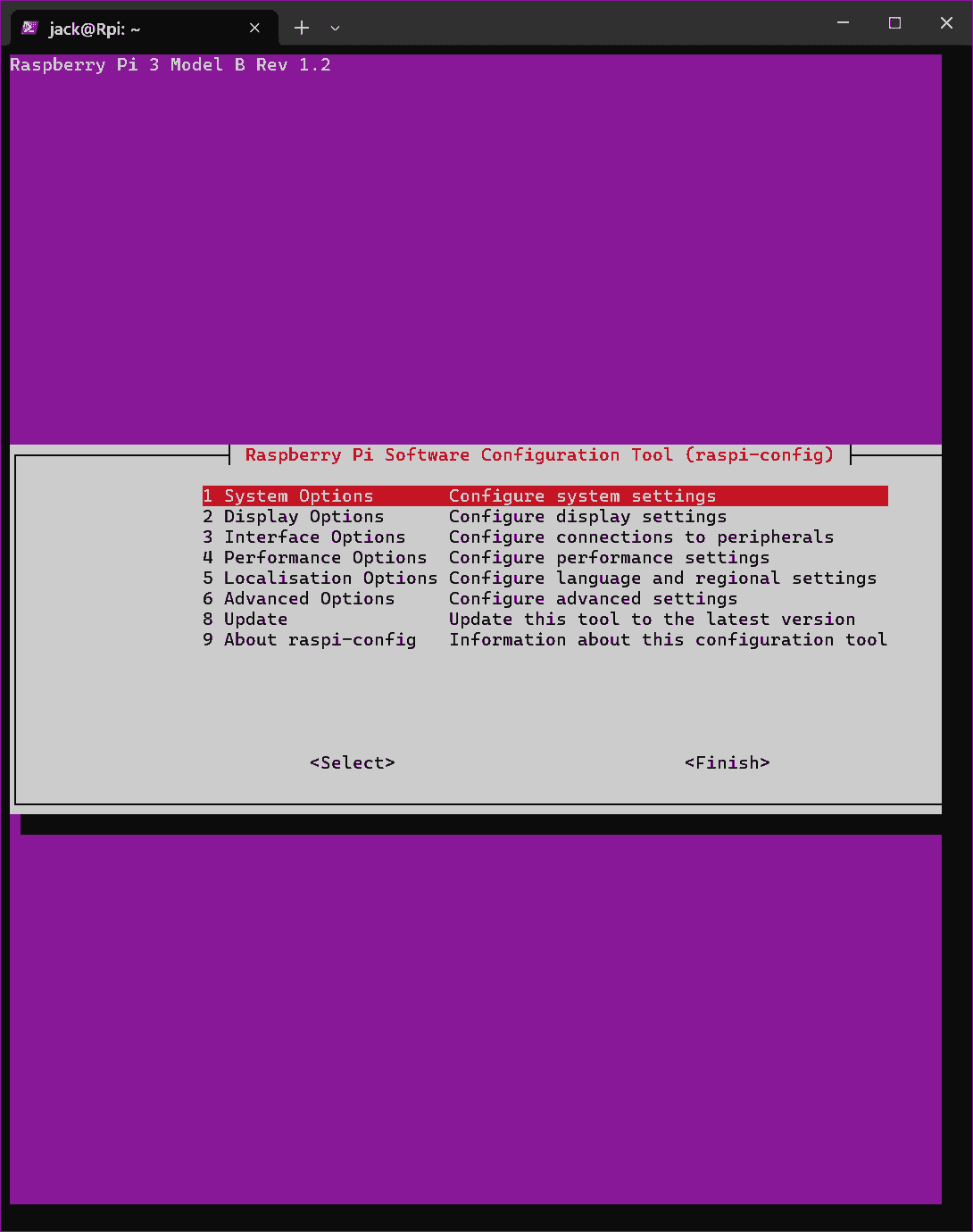
Verify SPI is enabled:
1
2
jack@Rpi:~$ ls /dev/spi* /dev/spidev0.0 /dev/spidev0.1- GPIO pinout (r3-RNT):
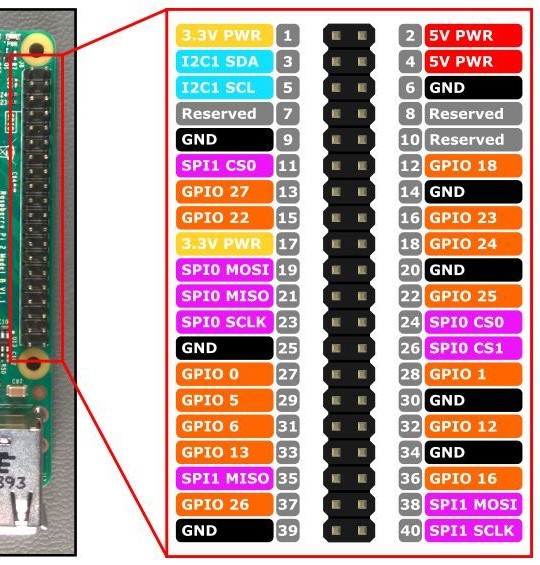

- GPIO pinout (r3-RNT):
-
SPI library on Raspberry Pi: wiringPi (r2-小鹏)
Lib Spidev
References:
-
- Searched by
树莓派 3B SPI 实验in DDG
- Searched by
-
Controlling an SPI device with the Raspberry Pi - Takaitra.com
- Refered by r1
-
- Searched by `` in DDG
-
- Searched by `` in DDG
Notes:
(2024-10-31)
-
SPI library for Python:
py-spidevCompile py-spidev from source code (r2-Takaitra)
- Installed
python3-devahead. - Use
python3instead ofpythonby setting the env${PYTHON}.
 1
 2
 3
 4
 5
 6
 7
 8
 9
10
11
12
13
14
15
16
17
18
19
20
21
22
23
24
25
26
27
28
29
30
31
32
33
34
jack@Rpi:~$ cd Programs/py-spidev/ jack@Rpi:~/Programs/py-spidev$ make python setup.py build make: python: No such file or directory make: *** [Makefile:4: all] Error 127 jack@Rpi:~/Programs/py-spidev$ ls CHANGELOG.md MANIFEST.in README.md setup.py LICENSE Makefile setup.cfg spidev_module.c jack@Rpi:~/Programs/py-spidev$ cat Makefile PYTHON ?= python all: $(PYTHON) setup.py build install: $(PYTHON) setup.py install clean: $(PYTHON) setup.py clean rm -rf build dist cleandir distclean: clean $(PYTHON) setup.py clean -a jack@Rpi:~/Programs/py-spidev$ echo ${PYTHON} jack@Rpi:~/Programs/py-spidev$ export PYTHON='python3' jack@Rpi:~/Programs/py-spidev$ echo ${PYTHON} python3- Error:
gccmissed
 1
 2
 3
 4
 5
 6
 7
 8
 9
10
11
12
13
14
15
16
17
18
19
20
21
22
23
24
25
jack@Rpi:~/Programs/py-spidev$ make python3 setup.py build /usr/lib/python3/dist-packages/setuptools/dist.py:452: SetuptoolsDeprecationWarning: Invalid dash-separated options !! ******************************************************************************** Usage of dash-separated 'description-file' will not be supported in future versions. Please use the underscore name 'description_file' instead. This deprecation is overdue, please update your project and remove deprecated calls to avoid build errors in the future. See https://setuptools.pypa.io/en/latest/userguide/declarative_config.html for details. ******************************************************************************** !! opt = self.warn_dash_deprecation(opt, section) running build running build_ext building 'spidev' extension creating build creating build/temp.linux-aarch64-cpython-312 aarch64-linux-gnu-gcc -fno-strict-overflow -Wsign-compare -DNDEBUG -g -O2 -Wall -fPIC -I/usr/include/python3.12 -c spidev_module.c -o build/temp.linux-aarch64-cpython-312/spidev_module.o error: command 'aarch64-linux-gnu-gcc' failed: No such file or directory make: *** [Makefile:4: all] Error 1-
Have use
apt-file serach aarch64-linux-gnu-gcc, which lists many packages.1 2 3 4 5jack@Rpi:~/Programs/py-spidev$ apt-file search aarch64-linux-gnu-gcc gcc-11: /usr/bin/aarch64-linux-gnu-gcc-11 gcc-11: /usr/bin/aarch64-linux-gnu-gcc-ar-11 gcc-11: /usr/bin/aarch64-linux-gnu-gcc-nm-11 ... -
Need to install
gcc, the default version is 141 2 3 4 5 6 7 8 9 10 11 12 13 14 15 16 17 18 19 20 21 22 23 24 25 26 27 28 29 30 31 32 33 34 35 36 37 38 39 40 41 42 43jack@Rpi:~/Programs/py-spidev$ dpkg -l gcc dpkg-query: no packages found matching gcc jack@Rpi:~/Programs/py-spidev$ gcc -v Command 'gcc' not found, but can be installed with: sudo apt install gcc jack@Rpi:~/Programs/py-spidev$ sudo apt install gcc Installing: gcc Installing dependencies: cpp gcc-14-aarch64-linux-gnu libhwasan0 libtsan2 cpp-14 gcc-aarch64-linux-gnu libisl23 libubsan1 cpp-14-aarch64-linux-gnu libasan8 libitm1 cpp-aarch64-linux-gnu libcc1-0 liblsan0 gcc-14 libgcc-14-dev libmpc3 Suggested packages: cpp-doc gcc-multilib libtool gdb gdb-aarch64-linux-gnu gcc-14-locales autoconf flex gcc-doc cpp-14-doc automake bison gcc-14-doc Summary: Upgrading: 0, Installing: 18, Removing: 0, Not Upgrading: 2 Download size: 45.1 MB Space needed: 148 MB / 57.1 GB available Continue? [Y/n] ... jack@Rpi:~/Programs/py-spidev$ gcc -v Using built-in specs. COLLECT_GCC=gcc COLLECT_LTO_WRAPPER=/usr/libexec/gcc/aarch64-linux-gnu/14/lto-wrapper OFFLOAD_TARGET_NAMES=nvptx-none OFFLOAD_TARGET_DEFAULT=1 Target: aarch64-linux-gnu Configured with: ../src/configure -v --with-pkgversion='Ubuntu 14.2.0-4ubuntu2' --with-bugurl=file:///usr/share/doc/gcc-14/README.Bugs --enable-languages=c,ada,c++,go,d,fortran,objc,obj-c++,m2,rust --prefix=/usr --with-gcc-major-version-only --program-suffix=-14 --program-prefix=aarch64-linux-gnu- --enable-shared --enable-linker-build-id --libexecdir=/usr/libexec --without-included-gettext --enable-threads=posix --libdir=/usr/lib --enable-nls --enable-bootstrap --enable-clocale=gnu --enable-libstdcxx-debug --enable-libstdcxx-time=yes --with-default-libstdcxx-abi=new --enable-libstdcxx-backtrace --enable-gnu-unique-object --disable-libquadmath --disable-libquadmath-support --enable-plugin --enable-default-pie --with-system-zlib --enable-libphobos-checking=release --with-target-system-zlib=auto --enable-objc-gc=auto --enable-multiarch --enable-fix-cortex-a53-843419 --disable-werror --enable-offload-targets=nvptx-none=/build/gcc-14-T7YiXd/gcc-14-14.2.0/debian/tmp-nvptx/usr --enable-offload-defaulted --without-cuda-driver --enable-checking=release --build=aarch64-linux-gnu --host=aarch64-linux-gnu --target=aarch64-linux-gnu --with-build-config=bootstrap-lto-lean --enable-link-serialization=2 Thread model: posix Supported LTO compression algorithms: zlib zstd gcc version 14.2.0 (Ubuntu 14.2.0-4ubuntu2)
- Installed
-
After
makesucceeded,sudo make installexecutessetup.pywherepythonappears as well.1 2 3 4 5 6 7 8 9 10 11 12 13 14 15 16jack@Rpi:~/Programs/py-spidev$ sudo make install python setup.py install make: python: No such file or directory make: *** [Makefile:7: install] Error 127 jack@Rpi:~/Programs/py-spidev$ echo ${PYTHON} python3 jack@Rpi:~/Programs/py-spidev$ cat -n Makefile | sed -n 1,7p 1 PYTHON ?= python 2 3 all: 4 $(PYTHON) setup.py build 5 6 install: 7 $(PYTHON) setup.py installI saw the fist line of
setup.pyis#!/usr/bin/env python, so I suspected thepythonhere also needs to “remap” topython3.-
Create an alias
pythonforpython3doesn’t work for the ``1 2jack@Rpi:~/Programs/py-spidev$ sudo apt install neovim jack@Rpi:~/Programs/py-spidev$ nvim ~/.bashrc-
Append a command at the end of the
~/.bashrc:1 2# (2024-10-31) alias python="python3" -
Still cannot override
pythoneven I have set the environment variable:1 2 3 4 5 6 7 8 9jack@Rpi:~/Programs/py-spidev$ export PYTHON='python3' jack@Rpi:~/Programs/py-spidev$ sudo make install python setup.py install make: python: No such file or directory make: *** [Makefile:7: install] Error 127 jack@Rpi:~/Programs/py-spidev$ echo ${PYTHON} python3
-
-
However,
sudo make install PYTHON=python3works, as suggested by ChatGPT.1 2 3 4 5 6 7 8... Processing spidev-3.6-py3.12-linux-aarch64.egg creating /usr/local/lib/python3.12/dist-packages/spidev-3.6-py3.12-linux-aarch64.egg Extracting spidev-3.6-py3.12-linux-aarch64.egg to /usr/local/lib/python3.12/dist-packages Adding spidev 3.6 to easy-install.pth file Installed /usr/local/lib/python3.12/dist-packages/spidev-3.6-py3.12-linux-aarch64.egg Processing dependencies for spidev==3.6
-
Demo Code
(2024-11-01)
-
Code: “spi_test.py” (r2-Takaitra)
1 2 3 4 5 6 7 8 9 10 11 12 13 14 15 16 17 18 19 20import spidev import time spi = spidev.SpiDev() spi.open(0, 0) # arguments: (bus, device), i.e., (SPI0, CS0) spi.max_speed_hz = 7629 spi.mode = 0b01 # [CPOL | CPHA] # Split an integer input into a two byte array to send via SPI def write_pot(input): msb = input >> 8 # Shift the higher 8 bits to the lower half lsb = input & 0xFF # Only keep the lower 8 bits spi.xfer([msb, lsb]) # Repeatedly switch a MCP4151 digital pot off then on while True: write_pot(0x1FF) time.sleep(0.5) write_pot(0x00) time.sleep(0.5)Execute this script, the program will keep running forever:
1python3 spi_test.py
Pinout
References:
-
Raspberry Pi hardware - Raspberry Pi Documentation
- Searched by
raspberry pi 3B pinoutin DDG
- Searched by
-
Raspberry Pi Pinout
- Found in video: Windows下通过串口连接树莓派 Raspberry Pi (USB to TTL, PuTTY) - bilibili - 老刘玩机
- Searched by
树莓派3D 串口 实验in bilibili
-
- Searched by
- Searched by
Notes:
(2024-11-01)
-
Check pinout with command
pinout1 2sudo apt install python3-gpiozero pinout
(2024-11-29)
- The serial (TX and RX) on Model 3B are turned off by default, because they are occupied by the Bluetooth r2-bilibili.
UART
Comm With Arduino
References:
-
How to read data through UART - Raspberry Pi Forums
- Searched by
raspberry pi uart receive and display on terminalin Google
- Searched by
-
树莓派4 UART 多串口配置通信 | 树莓派实验室
- Searched by
树莓派 UARTin Google
- Searched by
-
UART配置- 树莓派中文文档
- Searched by in s2
-
- Searched by
- Searched by
Notes:
(2024-11-29)
- Arduino:
Serial.write(), and Raspberry Pi print the received message in terminal r1-Forum.
(2024-12-05)
- The pin: TX1 and RX0 both are 5V, whereas the UART on Rpi is 3.3V. So they cannot connect directly r3-Hackpi.