Table of contents
一级标题
二级标题
正文
bold text (设置快捷健 ,b
italic text (斜体快捷键 ,i)
bold italic
wasted text (删除线 ,s)
3个` 括起来是代码块(1左边那个键)
加上python会显示对应的高亮
|
|
[Named Link](http://www.baidu.com/"Named link title")
heading-1 (转到一级标题处)
| First Header | second Header |
|---|---|
| Content Cell | Content Cell |
| content Cell | content cell |
一行代码 用` `括起来
code
- Bullet List Item1 (*号和文字之间有空格)
- Nested bullet
- Sub_nested bullet etc
- Sub_nested
- sub_nested
- Sub_nested
- Sub_nested bullet etc
- Nested bullet
- Bullet List item 2
1.A number list 1. A nested numbered list 2, which is numbered 2.which is numberd
- [] An uncompleted task ( - 和 [ 之间有空格)
- A complete task
- [] A subtask
引用块
子引用块
— 水平线
-
Title 1
折叠内容Content 1 Content 1 Content 1 Content 1 Content 1
-
F
多行公式独立编号:(来源:Markdown下LaTeX公式、编号、对齐)
$$ \begin{eqnarray*} x^n+y^n &=& z^n \tag{1.4} \\ x+y &=& z \tag{1.5} \end{eqnarray*} $$单个公式换行:
单个公式很长的时候需要换行,但仅允许生成一个编号时,可以用split标签包围公式代码,在需要转行的地方使用\\,每行需要使用1个&来标识对齐的位置,结束后可使用\tag{...}标签编号。
字母头上 ^
|
|
用 vim 插件 MarkdownPreview 在浏览器中可以正确渲染这个公式,
但是 Hugo 的KaTex 需要多打一个back slash:\\^θ 才能正确渲染,但这样做 vim 插件里就渲染不对了。
单行写分段函数
For katex, there is one more \
|
|
(从知乎看到的,忘了记录是哪个帖子)
交换图表
MathJax基础(10):Commutative diagrams
$$ $\require{AMScd}$ \begin{CD} A @>a>> B\\ @V b V V= @VV c V\\ C @>>d> D \end{CD} $$mermaid style
Anchor
Uppercase -> lowercase; Spaces -> -
Github Markdown anchor only linking to top of the page
图片
Images side by side
table
|
|
figure
-
Problems:
- Display multiple image horizontally without using .css file
-
Supports:
-
<figure style="">1 2 3 4 5<figure style="display: flex; justify-content: space-between; align-items: center;"> <img src="path/to/image1.jpg" alt="Description of image 1" style="width: 48%;"> <img src="path/to/image2.jpg" alt="Description of image 2" style="width: 48%;"> </figure> <figcaption style="text-align: center; margin-top: 8px;">Fig.1 - Two images side-by-side using inline styles.</figcaption>
::: aside
-
图片 caption
-
Use
<figcaption>-
References: {{{
-
Supports:
(2025-09-13T19:47)
-
Warp the
<img>tag in a<figure>tag:1 2 3 4<figure> <img src="path/to/img.png" alt="Alternative text" width="280"></img> <figcaption>Description</figcaption> </figure>
-
-
特殊字符
Common Unicode
-
U+2016 ‖ DOUBLE VERTICAL LINE
-
White square: □ U+25A1 White Square Unicode Character - Compart
-
There is no superscript comma in unicode. Superscripting any Letter/Number for comma
-
left ceil, left floor, right ceil, right floor:
⌈x₀⌉ |x₁| ⌊x₂⌋
-
circle:
⦿
Clipboard of symbl.cc
εφμf𝐱⋱⋮⋯⌊⌋σ√↓↑↓▼⬇λ˙⋅□↑⇔γβ∈α∑×‖⑊ ⊠∂Λθ∭∞°Σ➔©→✅⬯⬭τδ⊗∫𝚺𝛍𝐔𝐈𝐮∈𝐱𝐌𝐖𝚫ℤω℮∏‖⊙⊛ηρ𝐝𝐜𝐕𝒢𝐭𝐉𝐦𝛈≈❙❘⇤↳⋮⋆⭑✦★•𝑳𝐿𝐲𝐏𝐩𝐪𝐚𝐛𝐦𝐧𝐊𝐑𝐭𝐀𝐁𝐐𝐂𝐇𝐅𝐕|⏐▭✚▱𝐘𝐗𝐳𝐃𝐄⬯˚∘Δ😊≤▱■⌷⍨⍩⍤⟨〈⟩⬮↘∇𝛁 ▦
-
Less than
<will be mis-parsed as a html syntax by vim-markdown, use ❮ (Heavy Left-Pointing Angle Quotation Mark Ornament, brackets), or math $<$(2025/02/11)
- Use html code:
<,>(Found when copying text out from a .docx in Gmail)
- Use html code:
-
${}$won’t render the curly braces { }, use { } (Fullwidth Curly Brackets)Or
$\\{ \\}$ -
画斜线角度不够,可以用 ellipsis ⋱⋰ (Up Right Diagonal Ellipsis)
-
可以在终端里显示的图形符号:Dingbats 集,和 Miscellaneous Symbols 里有一些。
-
括号:⦗,因为 goat 里 ( 显不出来,也可以用中文括号(,不过显示出来偏右:和右边的字符有点重叠。
- Numbers in Dingbats: ➀ ➁ ➂ ➃ ➄ ➅ ➆ ➇ ➈ ➉
改变 md 属性
-
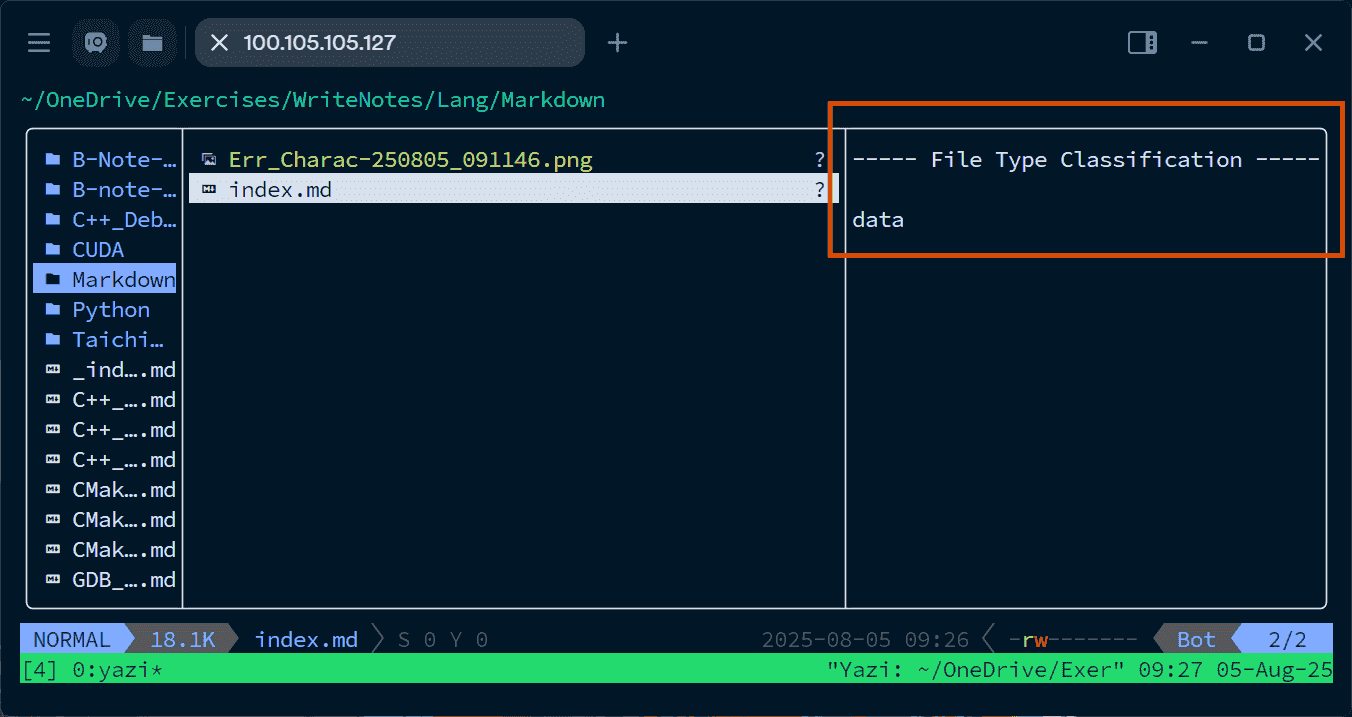
Ctrl + S 字符 (
^S) 会改变 Markdown 文件的文件类型-
Supports:
(2025-08-05T09:36)
-
一般 md 文件,在 yazi 里按回车会在终端里直接打开,但是如果文件中出现了
Ctrl+S字符, 打开方式就变成用 GUI 的软件打开
-
-
表格列宽
Cvt 2 Excel
References:
-
Online MD to XLS converter | Free GroupDocs Apps
- Searched by
convert markdown table to excel sheetin DDG
- Searched by
Notes:
(2024/12/20)
- Upload .md then download .xlsx r1-GroupDocs
整体缩放表格
-
用 css 样式
-
References: {{{
-
Supports:
(2025-08-28T15:08)
-
Define a sytle in the file r1-Gemini
1 2 3 4 5 6 7 8 9 10 11 12 13 14 15 16 17 18 19 20 21 22 23 24 25 26 27 28 29 30 31 32<style> /* Styles for the screen */ .my-table-wrapper { overflow-x: auto; /* Allow scrollbar on screen if needed */ } /* Styles ONLY for printing */ @media print { body { font-size: 10pt; /* Set base font size for the whole document */ } .my-table-wrapper { overflow-x: visible; /* Ensure no scrollbar is printed */ } .my-table-wrapper table { width: 100%; table-layout: fixed; } .my-table-wrapper th, .my-table-wrapper td { word-break: break-all; font-size: 9pt; /* Further reduce font in table if needed */ } } </style> <div class="my-table-wrapper"> | Header 1 | Header 2 | A_very_very_long_and_unbreakable_header_string_that_causes_issues | |----------|----------|-------------------------------------------------------------------| | Data 1 | Data 2 | Some content that needs to fit neatly on the printed page. | </div>
-
-
Vim 中单格换行
-
Problems:
-
用 vim 编辑 Markdown,一个 cell 的内容太多,让一行太长,不美观,不利于在 vim 中阅读
-
GoAT (diagon) 可以固定 table 的布局,但是数学公式无法渲染,也不可使用 html 语法
1 2 3 4 5 6 7 8 9 10 11 12 13 14 15\`\`\`goat ┌──────────────┬─────────────────────────┐ │ │ Ray │ ├──────────────┼─────────────────────────┤ │Function │ $y=x$ │ ├──────────────┼─────────────────────────┤ │Parametric │ (Origin, Direction, Len)│ │equations in │ │ │Vector form │ │ ├──────────────┼─────────────────────────┤ │Parametric │ $x = o_x + d_x t$ │ │equations in │ $y = o_y + d_y t$ │ │component form│ │ └──────────────┴─────────────────────────┘ \`\`\`
-
-
Supports:
-
Quarto supports multiline “grid” tables r1-GPT5
1 2 3 4 5 6 7 8 9 10 11 12 13+----------------------+------------------------------+ | | Ray | +======================+==============================+ | Function | $y = x$ | +----------------------+------------------------------+ | Parametric | (Origin, Direction, Len) | | equations in | | | Vector form | | +----------------------+------------------------------+ | Parametric | $x = o_x + d_x t$ | | equations in | $y = o_y + d_y t$ | | component form | | +----------------------+------------------------------+
::: aside
:::References
{{{ 1. [GPT5 - Markdown table cells multiline](https://chatgpt.com/c/6910f49b-62f0-832d-9867-d53846628f19) }}} -
分栏
Problems:
- 两个代码块并排显示,图片并排显示
VSCode extension: markdown-fence
-
References:
-
alislin/markdown-fence: Markdown Fence vscode 扩展,支持分栏格式
- Introduced in markdown 轻松支持并列分栏 - 废除的文章 - 知乎
- Searched by
markdown 如何实现两个代码块并排in DDG
-
alislin/markdown-fence: Markdown Fence vscode 扩展,支持分栏格式
Supports:
(2025-07-01T11:35)
-
Special syntax:
1 2 3 4 5<!-- fence:start --> ![img1]() <!-- fence --> ![img2]() <!-- fence:end -->
Use HTML Table
-
Problems:
- VSCode extension requires VSCode to generate html code, which is cumbersome.
-
Supports:
-
Use HTML table r1-Gemini:
1 2 3 4 5 6 7 8 9 10 11 12 13 14 15 16 17 18 19 20 21 22<table> <thead> <tr> <th style="text-align:left; padding:8px; border-bottom:1px solid #ddd;">Left title</th> <th style="text-align:left; padding:8px; border-bottom:1px solid #ddd;">Right title</th> </tr> </thead> <tbody> <tr> <td style="vertical-align: top; width: 50%; padding-right: 1rem;"> <pre style="margin:0;"><code class="language-c"> R_IIC00_Master_Send(0XC0, data_buf_tx, 1); </code></pre> </td> <td style="vertical-align: top; width: 50%;"> <pre style="margin:0;"><code class="language-c"> R_IIC00_Master_Send(0XC0, data_buf_tx, 1); </code></pre> </td> </tr> </tbody> </table>- Empty lines are not allowed.
::: aside
:::References
{{{ 1. [Gemini 2.5P - Markdown Two-Column Layout Methods](https://gemini.google.com/share/ed42f08f0ca3) 2. [Gemini 2.5P - 2-column layout in Markdown](https://chatgpt.com/c/690e4c7e-2084-8325-9023-0df26622653e) }}} -
打印分页
-
使用 html tag
-
References:
-
Supports:
(2025-07-22T11:03)
<div style="page-break-after: always;"></div>
-
公式
箭头指示
DDG search: “latex math equation block where a symbol is pointed by an upward arrow?”
Arrow to an equal symbol in a equation to justify it - SE
$$ a+b\underset{\substack{\color{red}\uparrow \\\ % or: \rotatebox{90}{$\longrightarrow$} \mathclap{\textup{\tiny commutative}} \\\ \mathclap{\textup{\tiny property}}}}{=}b+a $$符号加方框
|
|
multi-line
(2024/06/17)
-
$$ \sum_{\substack{1\le i\le n \\\ i\ne j}} $$\substack\atop vs. \substack for multiple lines under a sum ( First seen in mathpix)
-
$$ \overset{N}{=} \quad \underset{i=1}{=} $$\oversetandunderset
Mathjax
(2025-05-15T23:28)
-
不支持使用
$$ 𝐭' = 𝐏⋅ 𝐓_{w2c}⋅ [^{\bm \mu}_1] \\\ $$\bm加粗,例如:[^{\bm \mu}_1]:
Small text
(2024-05-24)
-
Use the attribute
font-sizeof tag<p>, e.g.,<p style="font-size:10px">text</p>:text
-
Keep the text inline without going to a new line:
<span style="font-size:10px; color:red;">text</span>: text -
<small>text</small>: text -
Deprecated in HTML5:
<font size="3" color="red">text</font>: text
iframe
(2024-01-21)
-
The size of the content can be set as below:
1 2 3 4 5<iframe width="560" height="315" src="https://www.youtube.com/embed/-P28LKWTzrI?si=szYmMkdL7Ixw-6_4" title="YouTube video player" frameborder="0" allow="accelerometer; autoplay; clipboard-write; encrypted-media; gyroscope; picture-in-picture; web-share" allowfullscreen></iframe>
Diagrams
Mermaid
mermaid-cli
References:
- mermaid-js/mermaid-cli
-
Could not find expected browser chrome locally - Stack Overflow
- Searched by
mermaid Error: Could not find Chrome (ver. 131.0.6778.85). This can occur if eitherin DDG
- Searched by
Notes:
(2024-07-25)
-
Steps
-
Install
1npm install -g @mermaid-js/mermaid-cli -
Edit
input.mmd:1 2 3 4 5classDiagram-v2 class Pancake { } class Waffle { } -
Export to svg: usage
1mmdc -i input.txt -o output.svg -b transparent- Either
.mmdor.txtworks.
- Either
-
Export to png:
1mmdc -i input.mmd -o out.pngThe content of the
input.mmdis pure mermaid syntax:1 2flowchart TD Start(("Start")) --> Initialize["Initialize"] --> End(("End"))
-
-
No chrome found?
1 2 3 4 5 6 7 8 9 10 11 12 13zichen@House:~/OneDrive/Exercises/Experiments/Embed/03_05-Guide-Hongsheng-LIN_Program$ mmdc -i test.txt -o output.svg -b transparent Generating single mermaid chart Error: Could not find Chrome (ver. 131.0.6778.85). This can occur if either 1. you did not perform an installation before running the script (e.g. `npx puppeteer browsers install chrome-headless-shell`) or 2. your cache path is incorrectly configured (which is: /home/zichen/.cache/puppeteer). For (2), check out our guide on configuring puppeteer at https://pptr.dev/guides/configuration. at ChromeLauncher.resolveExecutablePath (file:///usr/local/lib/node_modules/@mermaid-js/mermaid-cli/node_modules/puppeteer-core/lib/esm/puppeteer/node/BrowserLauncher.js:266:27) at ChromeLauncher.executablePath (file:///usr/local/lib/node_modules/@mermaid-js/mermaid-cli/node_modules/puppeteer-core/lib/esm/puppeteer/node/ChromeLauncher.js:202:25) at ChromeLauncher.computeLaunchArguments (file:///usr/local/lib/node_modules/@mermaid-js/mermaid-cli/node_modules/puppeteer-core/lib/esm/puppeteer/node/ChromeLauncher.js:83:37) at async ChromeLauncher.launch (file:///usr/local/lib/node_modules/@mermaid-js/mermaid-cli/node_modules/puppeteer-core/lib/esm/puppeteer/node/BrowserLauncher.js:45:28) at async run (file:///usr/local/lib/node_modules/@mermaid-js/mermaid-cli/src/index.js:500:17) at async cli (file:///usr/local/lib/node_modules/@mermaid-js/mermaid-cli/src/index.js:202:3)This issue is solved by installing the packages showed in the prompts r2-SO:
1 2 3 4 5 6zichen@House:~/OneDrive/Exercises/Experiments/Embed/03_05-Guide-Hongsheng-LIN_Program$ npx puppeteer browsers install chrome-headless-shell Need to install the following packages: puppeteer@23.9.0 Ok to proceed? (y) y chrome-headless-shell@131.0.6778.85 /home/zichen/.cache/puppeteer/chrome-headless-shell/linux-131.0.6778.85/chrome-headless-shell-linux64/chrome-headless-shell
Mermaid CDN
-
Problems:
(2025-09-16T09:04)
- Quarto internal mermaid doesn’t perform well.
-
References:
-
Supports:
(2025-09-16T09:30)
-
The following snippetr1-Docs written in an markdown file won’t be rendered by MarkdownPreviewEnhanced
1 2 3 4 5 6 7 8 9<pre class="mermaid"> graph LR A --- B B-->C[fa:fa-ban forbidden] B-->D(fa:fa-spinner); </pre> <script type="module"> import mermaid from 'https://cdn.jsdelivr.net/npm/mermaid@11/dist/mermaid.esm.min.mjs'; </script>- It may need extra command to trigger rendering.
- The
index.mdgenerated by executingquarto render index.qmdseems to contain javascript syntax for mermaid diagram.
-
An html containing a mermaid diagram can be displayed with iframe. However, Hugo has difficulty to locate the html file.
-
Circuits
(2024-10-15)
-
I wanted to include analog circuits in my blog post. The PlantUML seems not to support circuits diagrams after reading its docs.
-
Search: “can plantuml draw analog circuits?” in DDG
-
Making Drawing Circuits in Markdown a Cinch!
-
Insert ‘schemdraw’ svg in markdown
-
schemdraw-markdown: an extention for Python-Markdown
-
BTW, his blog (maybe: Pelican-blogsite) is really cool with various interactive presentation objects, such as PPT slides and ‘immich’ photo album.
-
-
Add Timestamp
Problems:
(2025-02-21)
- I want to add the current time as version label.
References:
-
javascript - Auto insert date and time in form input field? - Stack Overflow
- Searched by
javascript How to add the current data and time automatically in the markdown filein DDG
- Searched by
- DeepSeek
Notes:
-
One approach is to use an input field, where the current time is displayed by default r1-SO. However, in the VSCode extension: “Markdown-Preview-Enhanced”, the input field appears blank. And the time is missing after exporting the document to a PDF. The script works in a browser.
1 2 3 4 5 6 7 8 9 10 11 12 13 14 15 16 17 18 19 20 21 22 23 24 25 26 27 28 29 30 31 32 33 34 35 36 37### Method 1 <input type="date" id="myDate" /> <input type="time" id="myTime" /> <script type="text/javascript"> function SetDateTime() { var date = new Date(); // Set the date var day = date.getDate(); var month = date.getMonth() + 1; var year = date.getFullYear(); if (month < 10) month = "0" + month; if (day < 10) day = "0" + day; var today = year + "-" + month + "-" + day; document.getElementById('myDate').value = today; // Set the time var hours = date.getHours(); var minutes = date.getMinutes(); var seconds = date.getSeconds(); if (hours < 10) hours = "0" + hours; if (minutes < 10) minutes = "0" + minutes; if (seconds < 10) seconds = "0" + seconds; var currentTime = hours + ":" + minutes + ":" + seconds; document.getElementById('myTime').value = currentTime; } </script> <body onload="SetDateTime();"> Other contents...
-
Based on the above script, date and time can be obtained as plain text r2-DS:
This method can display the time after exporting PDF via Chrome -> PDF in the extension “Markdown-Preview-Enhanced”, although the time is not there in the preview window.
1 2 3 4 5 6 7 8 9 10 11 12 13 14 15 16 17 18 19 20 21 22 23 24 25 26 27 28 29 30 31 32 33 34 35 36 37 38 39 40 41 42 43 44 45 46### Method 2 <div id="markdown-content"> # My Markdown File **Date and Time:** <span id="currentDateTime"></span> This is some example Markdown content. </div> <script type="text/javascript"> function insertDateTime() { var date = new Date(); // Format the date var day = date.getDate(); var month = date.getMonth() + 1; var year = date.getFullYear(); if (month < 10) month = "0" + month; if (day < 10) day = "0" + day; var formattedDate = year + "-" + month + "-" + day; // Format the time var hours = date.getHours(); var minutes = date.getMinutes(); var seconds = date.getSeconds(); if (hours < 10) hours = "0" + hours; if (minutes < 10) minutes = "0" + minutes; if (seconds < 10) seconds = "0" + seconds; var formattedTime = hours + ":" + minutes + ":" + seconds; // Combine date and time var formattedDateTime = formattedDate + " " + formattedTime; // Insert the formatted date and time into the Markdown content document.getElementById('currentDateTime').textContent = formattedDateTime; } // Call the function to insert the date and time when the page loads insertDateTime(); </script> Other content ...
Code Call Graph
Problems:
- I want to place elements at exact positions in a diagram.
PlantUML for Call Stack
References:
-
JianpingCAI/call-stack-to-plantuml - GitHub
- Searched by
plantuml for call stack graphin DDG - Other tools are mentioned in Perplexity
- Searched by
-
6. Layout — The Hitchhiker’s Guide to PlantUML documentation
- Found in s1
Notes:
(2025/03/12)
-
Use Activity diagram to illustrate a code r1-GitHub
-
The positions of elements are determined by arrows r2-Hitchhiker
代码块自定义行号
Problems:
- Markdown 中的 Code block 的行号是从 1 开始,但是我想使用源文件中的行号
Issues:
- Use js library
Notes:
(2025-05-21T14:24)
-
Highlight.js
-
References:
-
注释
-
使用 html comment tag
<!-- -->中间不能有空行-
Supports:
(2025-08-25T11:07)
-
在 VSCode 插件 Markdown-preview-Enhanced 中, 如果注释语法错误,后文有的内容不会显示
下面的多行注释不会成功,因为有空行:
1 2 3 4 5 6<!-- * **References**: 1. <a id=""></a> [Article 1]() -->必须为连续,可能是因为 markdown 的连续几行会被解释成一行,如果有空行,就是两段了
1 2 3 4 5<!-- * **References**: 1. <a id=""></a> [Article 1]() --> -
必须是非空行,即使是有一个空格,也行。(这就是空格的意义)
1 2 3 4 5 6<!-- * **References**: 1. <a id=""></a> [Article 1]() -->
-
-
图文混排
-
Problems:
-
我想给文字加边框/下划线,并且在特定文字下面加箭头指示下一步推理。
-
Markdown 不能指定文本之间的相对位置
-
-
Supports:
- 使用 cssr1-GPT5, 但是复杂几何图形的绘制代码不好写
::: aside
:::References
{{{ 1. [GPT5 - Markdown 布局限制](https://chatgpt.com/s/t_690c1e913c94819180556b452600fc19) }}}
Integrate Excalidraw
-
Problems:
- Excalidraw 能否用程序绘制,并嵌入 Markdown?
-
Supports:
- @baptiste 的
minicali可以用命令生成简单的元素 r1-
::: aside
:::References
{{{ 1. [baptiste/minixcali](https://github.com/baptiste/minixcali)
Mentioned in [blag/ - maths in excalidraw](https://blag.bapt.xyz/posts/maths-excalidraw/) 2. [Integration | Excalidraw developer docs](https://docs.excalidraw.com/docs/@excalidraw/excalidraw/integration) }}} - @baptiste 的
-
Actions:
Excalidraw Render Math
Export Math from qmd to Excalidraw
-
Problems:
- @baptiste has already written many math equations in his qmd notes, so he wants to inserting those math blocks into Excalidraw.
::: aside
References
{{{ 1. [Quarto (maths) to Excalidraw #4144 · quarto-dev quarto-cli - GitHub](https://github.com/orgs/quarto-dev/discussions/4144)
Searched by `quarto qmd integrate excalidraw` at [DDG](https://duckduckgo.com/?q=quarto+qmd+integrate+excalidraw&ia=web) }}} -
Supports:
-
Quarto is based on
pandocr1-Gemini. By creating Pandoc custom writer, and defining filter rules, math blocks can be converted into svg. -
Branch:
math.preview.excalidraw.comr1-Gemini
::: aside
:::References
{{{ 1. [Gemini 2.5P - Quarto-Excalidraw Interoperability Discussion](https://gemini.google.com/u/1/app/75dd152969d32da9?pageId=none) 2. [Gemini 2.5P - Automating Excalidraw Math Import](https://gemini.google.com/u/1/app/015bc0595a89d342?pageId=none) }}} -
Convert to Markdown
MarkItDown
-
Problems:
- Convert various files to markdown for feeding LLM.
-
Supports:
- Comparison MarkItDown with Pandoc r1-RealPython
::: aside
:::References
{{{ 1. [Python MarkItDown: Convert Documents Into LLM-Ready Markdown - Real Python](https://realpython.com/python-markitdown/) }}}