Table of contents
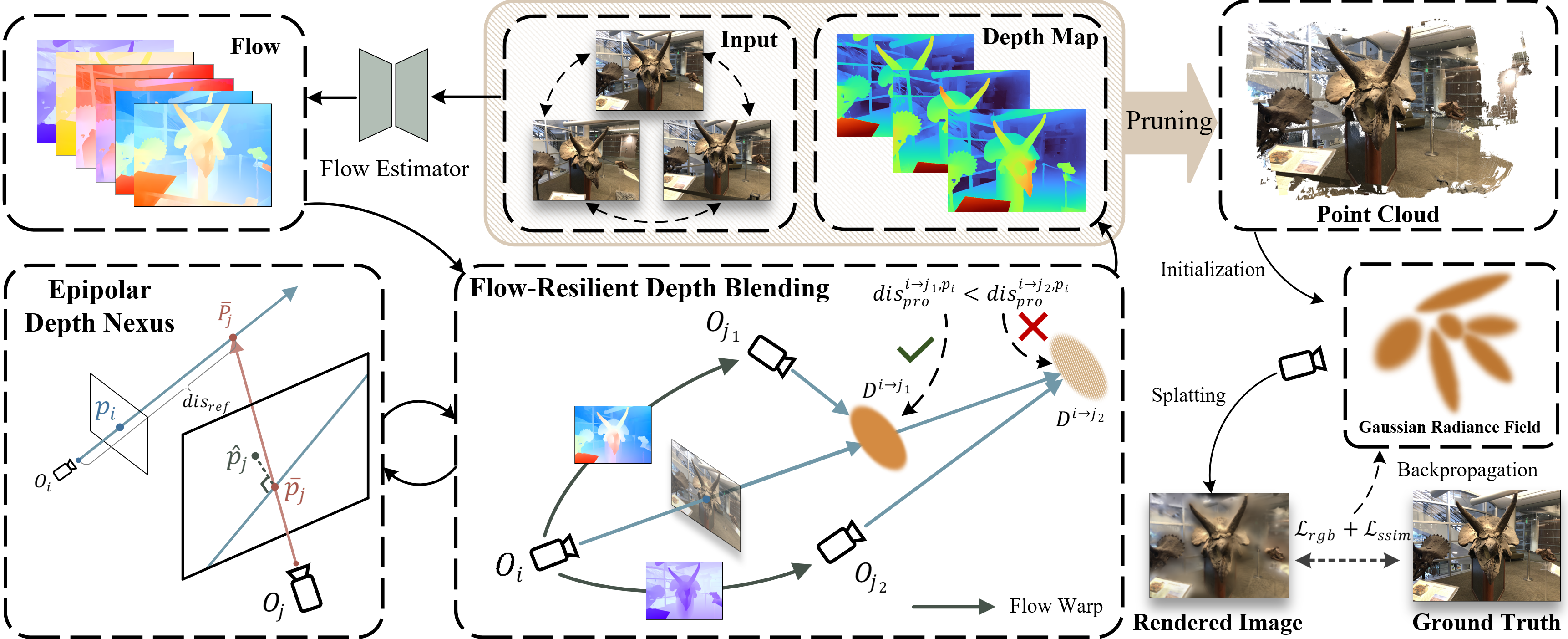
NexusGS
Environment
➀ Replace environment.yml
-
Problmes:
-
NexusGS borrowed FSGS’s
environment.ymlforconda-
Version of Python, PyTorch mismatched
-
Replace
environment.ymlafter git clone during building the Docker image
-
-
-
Supports:
-
Correct name, python version in
environment.yml1 2 3 4 5 6 7 8name: nexus dependencies: - python=3.10 - pip: - torch==2.0.0 --index-url https://download.pytorch.org/whl/cu118 - torchvision==0.15.1 --index-url https://download.pytorch.org/whl/cu118 - torchaudio==2.0.1 --index-url https://download.pytorch.org/whl/cu118 - numpy<2 -
Copy local environment.yml to the Docker image
1COPY environment.yml .::: {.notes}
- The local
environment.ymlis stored with Dockerfile together. :::
- The local
-
➁ Create Requirements.txt
-
Problmes:
-
Convert the environment.yml to a requirements.txt for pip.
Then, a uv environment can be created on the host machine for debugging.
-
-
Supports:
-
requirements.txtdoesn’t include python version -
requirements.txtdoesn’t includecudatoolkit, because Pip does not manage CUDA installtion. r1-GeminiIn other words, pip requires CUDA 11.8 to be installed on the host system for debugging.
::: aside
- References:
-
-
Actions:
- I’ll figure out how to debug inside the Docker container.
➂ Dockerfile Builds Image
-
Problmes:
- Create a running environment for NexusGS
-
Supports:
-
CUDA version limitation
The system can only have one active CUDA installation at a time. Currently, CUDA 11.3 is installed, but it doesn’t support PyTorch 2.0, which is used by NexusGS.
I don’t want to install another CUDA as it’s time consuming.
-
Containerized build
Build a docker container that includes the specific CUDA version.
-
Driver-CUDA relationship
The
nvidia-driveron the host machine determines the highest CUDA version supported, CUDA-enabled Docker images must be compatible with this driver version.
::: aside
- References: {{{
- USMizuki/NexusGS }}} :::
-
-
Actions:
-
Create a
Dockerfiler1-Gemini-
TODO: Migrate the source code to GitLab
-
Download source code to HDD for reading
1
2
cd /mnt/Seagate4T/04-Projects git clone https://github.com/USMizuki/NexusGS.git
-
-
Build image
1docker build -t nexusgs:latest /home/zichen/Projects/NexusGS -
Run container
1
2
3
4
docker run -it --rm --gpus all \ -v /path/to/your/datasets:/workspace/datasets \ -v /mnt/Seagate4T/04-Projects/NexusGS:/workspace/outputs \ nexusgs:latest
::: aside
- References:
-
➃ Pip Build Fail
-
Problmes:
-
Pip failed to build
submodules/diff-gaussian-rasterization-confidenceTraceback
{{{1 2 3 4 5 6 7 8 9 10 11 12 13 14 15 16 17 18 19 20 21 22 23 24 25 26 272.889 File "/opt/conda/envs/nexus/lib/python3.10/site-packages/setuptools/_distutils/command/build_ext.py", line 510, in _build_extensions_serial 2.889 self.build_extension(ext) 2.889 File "/opt/conda/envs/nexus/lib/python3.10/site-packages/setuptools/command/build_ext.py", line 264, in build_extension 2.889 _build_ext.build_extension(self, ext) 2.889 File "/opt/conda/envs/nexus/lib/python3.10/site-packages/setuptools/_distutils/command/build_ext.py", line 565, in build_extension 2.889 objects = self.compiler.compile( 2.889 File "/opt/conda/envs/nexus/lib/python3.10/site-packages/setuptools/_distutils/compilers/C/base.py", line 655, in compile 2.889 self._compile(obj, src, ext, cc_args, extra_postargs, pp_opts) 2.889 File "/opt/conda/envs/nexus/lib/python3.10/site-packages/torch/utils/cpp_extension.py", line 581, in unix_wrap_single_compile 2.889 cflags = unix_cuda_flags(cflags) 2.889 File "/opt/conda/envs/nexus/lib/python3.10/site-packages/torch/utils/cpp_extension.py", line 548, in unix_cuda_flags 2.889 cflags + _get_cuda_arch_flags(cflags)) 2.889 File "/opt/conda/envs/nexus/lib/python3.10/site-packages/torch/utils/cpp_extension.py", line 1773, in _get_cuda_arch_flags 2.889 arch_list[-1] += '+PTX' 2.889 IndexError: list index out of range 2.889 [end of output] 2.889 2.889 note: This error originates from a subprocess, and is likely not a problem with pip. 2.889 ERROR: Failed building wheel for diff_gaussian_rasterization 2.889 Running setup.py clean for diff_gaussian_rasterization 4.088 Failed to build diff_gaussian_rasterization 4.226 error: failed-wheel-build-for-install 4.226 4.226 × Failed to build installable wheels for some pyproject.toml based projects 4.226 ╰─> diff_gaussian_rasterization -------------------- ERROR: failed to build: failed to solve: process "/bin/sh -c pip install submodules/diff-gaussian-rasterization-confidence" did not complete successfully: exit code: 1}}}
-
-
Supports:
- Docker builds images using CPU, with no CUDA devices visible. Therefore, PyTorch cannot detect the GPU’s compute capability. r1-Gemini
::: aside
- References:
-
Actions:
-
Specify target CUDA compute capability
Set the
TORCH_CUDA_ARCH_LISTenvironment variable to tell the compiler which CUDA architecture to build for.1 2RUN TORCH_CUDA_ARCH_LIST="7.5 8.0 8.6 9.0" pip install submodules/diff-gaussian-rasterization-confidence RUN TORCH_CUDA_ARCH_LIST="7.5 8.0 8.6 9.0" pip install submodules/simple-knn
-
➄ Copy Dataset Failed
-
Problmes:
-
I don’t want to use the original dataset stored on my hard drive directly in the program, because I’m concerned it might be modified.
Therefore, I prefer to copy the dataset into the Docker container instead.
- TL;DR: Copy data is unnecessary.
-
-
Supports:
-
Use
COPYdocker command1 2# Copy the local 'datasets' folder into the container's workspace COPY ./datasets /workspace/datasetsThe workspace in container
1 2 3 4 5NexusGS/ ├── Dockerfile ├── datasets/ <-- Your datasets go here (e.g., LLFF folder) ├── scripts/ └── ... (other project files)COPYwill result in a bigger image.
-
Symbolic link is required
-
Data outside of the build context, i.e. the current folder (
.), is not accessible for the Docker daemon. -
Create a symbolic link that points to actual data
1ln -s /mnt/Seagate4T/05-DataBank/nerf_llff_data ./LLFF
-
::: aside
- References: {{{
-
-
Actions:
-
Modify the
Dockerfile1COPY ./LLFF/ /workspace/datasets/LLFF-
Note:
COPY ./LLFF /workspace/datasets/LLFFis different.Docker will process the symbolic link itself, instead of the content inside the LLFF folder.
-
-
Rebuild the image
1docker build -t nexusgs:latest . -
Run the container without mounting dataset
1 2 3docker run -it --rm --gpus all \ -v /mnt/Seagate4T/04-Projects/NexusGS/outputs:/workspace/outputs \ nexusgs:latest
-
-
Results:
-
COPYdata from a symbolic link is not allowed/LLFFis not found. It’s not included in the.dockerignore.
Error message
{{{1 2 3 4 5 6 7 8 9 10 11 12 13 14 15 16 17 18 19 20 21 22 23=> ERROR [ 8/10] COPY ./LLFF/ /workspace/datasets/LLFF 0.0s ------ > [ 8/10] COPY ./LLFF/ /workspace/datasets/LLFF: ------ Dockerfile:43 -------------------- 41 | 42 | # Copy the host 'nerf_llff_data' folder into the container's workspace 43 | >>> COPY ./LLFF/ /workspace/datasets/LLFF 44 | 45 | # Install the custom submodules -------------------- ERROR: failed to build: failed to solve: failed to compute cache key: failed to calculate checksum of ref da83f08b-6e43-4168-8960-34c6cc4c07ee::i715mm83err1nsdosaei0t2tl: "/LLFF": not found (base) zichen@zichen-X570-AORUS-PRO-WIFI:~/Projects/NexusGS$ ls -al total 16 drwxrwxr-x 3 zichen zichen 4096 Oct 2 21:31 . drwxrwxr-x 6 zichen zichen 4096 Oct 1 21:38 .. -rw-rw-r-- 1 zichen zichen 1782 Oct 2 21:31 Dockerfile drwxrwxr-x 8 zichen zichen 4096 Oct 2 13:35 .git lrwxrwxrwx 1 zichen zichen 41 Oct 2 21:27 LLFF -> /mnt/Seagate4T/05-DataBank/nerf_llff_data}}}
-
➅ Dataset Read-Only
-
Problmes:
- Set the volume to read-only to prevent it from being modified r1-Gemini
::: aside
- References: {{{
-
Supports:
-
Append
:roto the end of the volume definition, to make the mounted directory read-only inside the container1-v ./datasets:/workspace/datasets:ro
-
-
Actions:
-
Remove the
COPYcommand from the Dockerfile -
Rebuild the image
1docker build -t nexusgs:latest . -
Run container
1 2 3 4docker run -it --rm --gpus all \ -v /mnt/Seagate4T/05-DataBank/nerf_llff_data:/workspace/datasets/LLFF:ro \ -v /mnt/Seagate4T/04-Projects/NexusGS/output:/workspace/output \ nexusgs:latest
-
➆ Run LLFF fern
-
Problmes:
- Run the example case of LLFF fern
-
Supports:
-
NexusGS requires Optical flow data:
llff_flow1 2 3 4 5 6 7 8├── dataset ├── nerf_llff_data ├── fern ├── sparse ├── images ├── images_8 ├── 3_views <-- Copy from llff_flow ├── flow
-
-
Actions:
-
Mount flow data for each scene
Run container:
1 2 3 4 5docker run -it --rm --gpus all -v /mnt/Seagate4T/05-DataBank/nerf_llff_data:/workspace/dataset/nerf_llff_data:ro \ -v /mnt/Seagate4T/05-DataBank/llff_flow/fern/3_views:/workspace/dataset/nerf_llff_data/fern/3_views \ -v /mnt/Seagate4T/04-Projects/NexusGS/output:/workspace/output \ nexusgs:latest -
Execute shell script
Non-HuggingFace script: Run
train.py,render.py, andmetrics.py1sh scripts/run_llff.sh 0
-
-
Results:
-
Output
Log
{{{1 2 3 4 5 6 7 8 9 10 11 12 13 14 15 16 17 18 19 20 21 22 23 24 25 26 27 28 29 30 31 32 33 34 35 36 37 38 39 40 41 42 43 44 45 46 47 48 49 50 51 52 53 54 55 56 57 58 59 60root@d8ffb5435336:/workspace# sh scripts/run_llff.sh 0 [5000, 10000, 30000] Optimizing output/llff/fern/3_views Output folder: output/llff/fern/3_views [03/10 17:59:57] Reading camera 20/20 [03/10 17:59:58] 2.8834194898605348 cameras_extent [03/10 17:59:58] Loading Training Cameras [03/10 17:59:58] 3it [00:00, 5.73it/s] Loading Test Cameras [03/10 17:59:58] 3it [00:00, 198.50it/s] Loading Eval Cameras [03/10 17:59:58] 14it [00:00, 159.13it/s] /opt/conda/envs/nexus/lib/python3.10/site-packages/torch/functional.py:504: UserWarning: torch.meshgrid: in an upcoming release, it will be requ ired to pass the indexing argument. (Triggered internally at ../aten/src/ATen/native/TensorShape.cpp:3483.) return _VF.meshgrid(tensors, **kwargs) # type: ignore[attr-defined] Number of points at initialisation : 538504 [03/10 17:59:58] Number of points at initialisation : 538504 [03/10 17:59:58] Training progress: 17%|████████▋ | 5000/30000 [01:12<06:02, 68.88it/s, Loss=0.0012369, Points=525819] Downloading: "https://download.pytorch.org/models/vgg16-397923af.pth" to /root/.cache/torch/hub/checkpoints/vgg16-397923af.pth 100%|███████████████████████████████████████████████████████████████████████| 528M/528M [05:42<00:00, 1.62MB/s] Downloading: "https://raw.githubusercontent.com/richzhang/PerceptualSimilarity/master/lpips/weights/v0.1/vgg.pth" to /root/.cache/torch/hub/checkpoints/vgg.pth 100%|███████████████████████████████████████████████████████████████████████| 7.12k/7.12k [00:00<00:00, 15.2MB/s] 0%| | 0.00/7.12k [00:00<?, ?B/s] [ITER 5000] Evaluating test: L1 0.05085379630327225 PSNR 21.436749140421547 SSIM 0.701229194800059 LPIPS 0.20546899239222208 [03/10 18:06:57] [ITER 5000] Evaluating train: L1 0.0012755183658252158 PSNR 52.29058202107747 SSIM 0.9994754989941914 LPIPS 0.0005458221421577036 [03/10 18:07:01] Training progress: 33%|█████████████████ | 10000/30000 [08:20<05:07, 64.95it/s, Loss=0.0008756, Points=501851] [ITER 10000] Evaluating test: L1 0.048601570228735604 PSNR 21.6707280476888 SSIM 0.7072837154070536 LPIPS 0.2020971179008484 [03/10 18:08:22] [ITER 10000] Evaluating train: L1 0.0009691654122434556 PSNR 55.08801142374674 SSIM 0.9997365872065226 LPIPS 0.00024261641374323517 [03/10 18:08:25] Training progress: 100%|███████████████████████████████████████████████████| 30000/30000 [14:04<00:00, 35.51it/s, Loss=0.0007041, Points=447917] [ITER 30000] Evaluating test: L1 0.04780491938193639 PSNR 21.859390894571938 SSIM 0.7095310091972351 LPIPS 0.201074277361234 [03/10 18:14:07] [ITER 30000] Evaluating train: L1 0.000792427861597389 PSNR 56.9059575398763 SSIM 0.9998162388801575 LPIPS 0.00017058776090076813 [03/10 18:14:10] [ITER 30000] Saving Gaussians [03/10 18:14:10] Training complete. [03/10 18:14:12] Looking for config file in output/llff/fern/3_views/cfg_args Config file found: output/llff/fern/3_views/cfg_args Rendering output/llff/fern/3_views Loading trained model at iteration 30000 [03/10 18:14:15] Reading camera 20/20 [03/10 18:14:15] 2.8834194898605348 cameras_extent [03/10 18:14:15] Loading Training Cameras [03/10 18:14:15] 3it [00:01, 2.91it/s] Loading Test Cameras [03/10 18:14:16] 3it [00:00, 181.28it/s] Loading Eval Cameras [03/10 18:14:16] 14it [00:00, 221.72it/s] Rendering progress: 100%|█████████████████████████████████| 3/3 [00:00<00:00, 7.33it/s] Rendering progress: 100%|█████████████████████████████████| 3/3 [00:00<00:00, 7.43it/s] Scene: output/llff/fern/3_views Method: ours_30000 Metric evaluation progress: 100%|█████████████████████████| 3/3 [00:03<00:00, 1.22s/it] SSIM : 0.7092038 PSNR : 21.8406734 LPIPS: 0.2013377}}}
-
Code Understand
➀ DeepWiki
-
Problmes:
-
I study code through step-by-step debugging previously. But writing a VSCode debug config file still needs some time.
I recently noticed DeepWiki can give an detail explanation for a repo.
-
-
Supports:
- DeepWiki 在 “Environmental Setups”r1-DW 部分解读错误, 但是分析代码文件之间的逻辑关联还是有参考价值的,可以快速了解项目结构。
::: aside
- References: {{{
- DeepWiki - USMizuki/NexusGS }}} :::
➁ NotebookLM
-
Problmes:
-
我看陌生的英文文档会犯困,所以想听音频/看视频。
我知道 NotebookLM 可以生成音频,辅助学习
-
-
Supports:
-
Insert a URL as source, only one webpage is included, not all content on the site
-
It generates Flashcards for questioning.
::: aside
- References: {{{
- NotebookLM }}} :::
-
➂ Read Aloud
-
Problmes:
- 我阅读网页会睡着,我需要工具为我朗读网页
-
Supports:
-
AI Text Reader: Read Long Text Aloud Online, No Sign-Up - notegpt.io
Searched bywebpage ai read aloudat DDG -
Edge browser has a built-in Read Aloud function.
- It can jump to where I clicked.
-
➃ Debug Step-by-Step
-
Problmes:
- Use VSCode to debug the code with the llff fern dataset
-
Supports:
-
Hyperparameters in
run_llff.sh1 2 3 4 5 6 7 8 9 10 11 12 13python train.py --source_path dataset/nerf_llff_data/fern \ --model_path output/llff/fern/3_views \ --eval --n_views 3 \ --save_iterations 30000 \ --iterations 30000 \ --densify_until_iter 30000 \ --position_lr_max_steps 30000 \ --dataset_type llff \ --images images_8 \ --split_num 4 \ --valid_dis_threshold 1.0 \ --drop_rate 1.0 \ --near_n 2 \
-
-
Actions:
-
Create a
launch.jsonfile for debuggingPython Debugger –> Python File with Arguments
-
➄ Debug Inside Container
-
Problmes:
-
I don’t want to install
CUDAon the host machine.How to debugg the python program within a docker container?
PDB? GDB? or VSCode headless?
-
-
Supports:
- Use
debugpy
::: aside
- References:
- Use
Eval on DTU
➀ Ask DeepWiki
-
Problmes:
- How do I prepare the dataset as a DTU data_type?
::: aside
- References: {{{
➁ Export Point Cloud
-
Problmes:
-
Dataflow
-
-
Supports:
-
Colmap dataset type is determined by the existence of
sparsedirectorySources:
scene/__init__.py, line #53
-