Table of contents
Code | Arxiv | ProjPage | OpenReview | Ytb
Note
Abs
-
Transfer between different modalities: image classification and video understanding
-
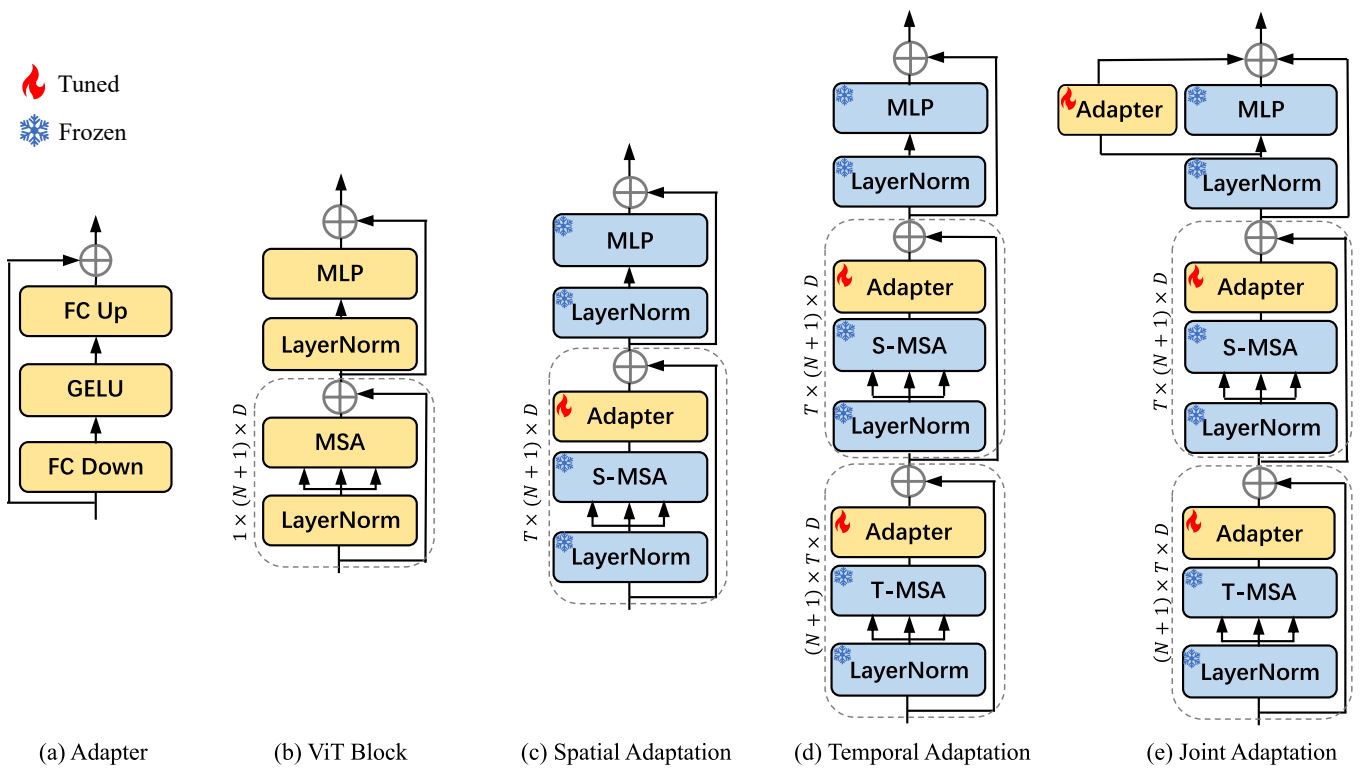
Add 3 new layers inside each transformer block, not at the very end of the model.
-
3 new layers:
- Spatial adapter is after self-attention;
- Temporal adapter is after two self-attention,
- Joint adapter is a bypass branch of the MLP layers.
-
Frozen pre-trained parameters and optimize only the new layers to transfer the pre-trained model onto another task.
Intro
- Two directions: adding temporal module onto or inflating an image transformer model both have drawbacks: heavy-computation full fine-tunning is required.
Related work
- Pre-trained image models have good transferability.
- Fully fine-tuning a transformer-based image model is uneconomical.
- Parameter-efficient finetuning was applied on LLM for downstream tasks.
Method
-
ViT consists of 12 encoder blocks (MSA and MLP).
-
An image is split into N pathes, which will be projected to D channels;
-
The input to MSA is each patch attached class token channel and added positional encoding.
-
-
Space-only model (baseline, no temporal modelong): Apply pre-trained frozen ViT onto video by processing each frame independently.
-
Each frame will be represented by the final class token.
-
The token of each frames are averaged to form a vector for predicting
-
-
Spatial adaptation is adding an adapter after the self-attention (pre-trained MSA) fuses N+1 patches.
-
An adapter is a bottleneck, i.e, Reduce-Act-Expand with skip connection.
-
This can achieve comparable performance compared with space-only baseline, because image model learns spatial feature well.
-
-
Temporal modeling reused the self-attention parameters again, whereas the T frames got fused by reshapeing the tensor.
-
Another adapter is appended for adapting the generated temporal features.
-
Temporal modeling is performed ahead of spatial modeling, so the adapter is removed skip connection and initialized as zero to avoid disrupting the perfomance of the original model.
-
By reusing the MSA, the number of parameters is maintained.
-
-
Joint adapation jointly fits the temporal features and spatial features.
-
This adapter also doesn’t has skip connection.
-
Average the final class token of each frame and pass it to classification head.
-
Experiments
Task: classification video?
- 8 frames
- Memory: AIM based on Swin-B pre-trained with IN-21K occupies 9GB.
- Underperform on temporal-heavy video because the temporal modeling is simply reusing the spatial modeling parameters.
Discussion
- Deeper layer needs adaptation for task-specific features, while shallow layer may not.
Conclusion
- Transfer models trained with other sequence data, like text and audio for video action recognition.
(224,224,3)") --> cls("Class token
(1,768)") & pe("Position Embedding
(197,768)") input --> feat("Conv2d (16x16,s16)
(14,14)") cls & feat --> Cat pe & Cat --> add1("Add") add1 --> msa1("MSA") --> Tadap --> msa2("MSA") --> Sadap Sadap --> ineck("Inverse
bootleneck") Sadap --> Jadap add1 & ineck & Jadap --> add2("Add") --> x
Play
Debug code with experiment settings in “run_exp.sh”
Environment
|
|
Dataset diving48
-
To prepare the dataset diving48 , I downloaded the repo MMAction2 Documentaions
1 2 3 4 5 6 7 8 9 10 11 12 13 14 15conda create --name openmmlab python=3.8 -y conda activate openmmlab conda install pytorch torchvision -c pytorch # Step 1: pip install -U openmim mim install mmengine mim install mmcv mim install mmdet mim install mmpose # Step 2: git clone https://github.com/open-mmlab/mmaction2.git cd mmaction2 pip install -v -e . -
Following “Download from Official Source” section.
- Download annotations using their shell script.
bash download_annotations.sh - Download videos “Diving48_rgb.tar.gz” (9.6G)
- Only extract the rgb frames:
bash extract_rgb_frames_opencv.sh - Generate file list using program:
bash generate_videos_filelist.sh
- Download annotations using their shell script.
-
Make a symbolic link to “mmaction2/data” in “adapt-image-models”:
ln -s /home/zichen/Downloads/mmaction2/data/ ./
Format
- annotation file “data/diving48/diving48_train_list_videos.txt” includes: filename and class label of each video
Config for 1080Ti
-
Train with 1 video cannot make the acc increase
-
Default configs (8 videos, 32 frames) will cause 1 1080Ti OOM. (“configs/recognition/vit/vitclip_large_diving48.py”)
-
Override the number of videos in config file with args:
1 2 3"args":[ "--cfg-options", "data.videos_per_gpu=1" ]But the
top1_accdidn’t grow:1 2 3 4 52023-08-31 12:22:11,768 - mmaction - INFO - Epoch [1][4180/15027] lr: 6.003e-05, eta: 6 days, 8:30:03, time: 0.709, data_time: 0.001, memory: 5659, top1_acc: 0.0500, top5_acc: 0.3500, loss_cls: 3.4383, loss: 3.4383 -
"data.videos_per_gpu=2"will OOM.
-
-
Reduce
num_frames.vscode/launch.json is made based on “run_exp.sh”:
1 2 3 4 5 6 7 8 9 10 11 12"args": [ "--cfg-options", "model.backbone.pretrained=openaiclip", "work_dir=work_dirs_vit/diving48/debug", "data.videos_per_gpu=8", "model.backbone.num_frames=3", // The follwings cannot change // "train_pipeline[1].clip_len=3", // "val_pipeline[1].clip_len=3" "--train_clip_len", "{\"1\": {\"clip_len\": 3}}" ](2023-09-06) The
cfg.data.train['pipeline']['clip_len']didn’t changed, which still equals 32. Consequently, the imagesxpassed toforward(self, x)of modelViT_CLIPhas the shape (256, 197, 768)However, the instance variable
self.num_framesof the backbone modelViT_CLIPwas changed to 3.Then, the
einops.rearrangecannot parse the dimensionality in:x = rearrange(x, '(b t) n d -> (b n) t d', t=self.num_frames)1 2einops.EinopsError: Shape mismatch, can't divide axis of length 256 in chunks of 3Dataset is built based the key
cfg.data.train, thus, its values are also required to update:1 2 3cfg.merge_from_dict(dict(train_pipeline=args.train_clip_len, val_pipeline=args.train_clip_len)) update_option = {'data': {'train': {'pipeline': args.train_clip_len}, 'val': {'pipeline': args.train_clip_len}}} cfg.merge_from_dict(update_option)Start training:
1 2 3 4 5 6 7 8 9 10 11 12 13export CUDA_VISIBLE_DEVICES=4 python -m torch.distributed.launch \ --nproc_per_node=1 --master_port=29500 \ tools/train.py \ "configs/recognition/vit/vitclip_base_diving48.py" \ --launcher="pytorch" \ --test-last \ --validate \ --cfg-options model.backbone.pretrained="openaiclip" \ work_dir="work_dirs_vit/diving48/debug" \ data.videos_per_gpu=8 \ model.backbone.num_frames=3 \ --train_clip_len "{\"1\": {\"clip_len\": 3}}"
Optimization
- AdamW: lr=3e-4, weight_decay=0.05,
- LR scheduler: CosineAnnealing
Pseudocode
With backbone: ViT_CLIP
\begin{algorithm}
\caption{main()}
\begin{algorithmic}
\PROCEDURE{Config}{cfg, args}
\STATE args = parse\_args()
\PROCEDURE{Config.fromfile}{args.config}
\STATE model settings
\STATE dataset settings: ann\_file, train\_pipeline,...
\STATE optimizer settings
\STATE learning policy
\STATE runtime settings
\ENDPROCEDURE
\ENDPROCEDURE
\STATE $\newline$
\PROCEDURE{build-model}{cfg.model}
\COMMENT{Construct ViT with Adapters added}
\PROCEDURE{build-localizer}{cfg}
\PROCEDURE{LOCALIZERS.build}{cfg}
\PROCEDURE{BaseRecognizer}{}
\STATE $\newline$
\PROCEDURE {builder.build-backbone}{backbone}
\STATE BACKBONES.build(cfg)
\ENDPROCEDURE
\STATE $\newline$
\PROCEDURE {init-weights}{}
\STATE self.backbone.init\_weights()
\COMMENT{Load pretrained state\_dict}
\ENDPROCEDURE
\STATE $\newline$
\ENDPROCEDURE
\ENDPROCEDURE
\ENDPROCEDURE
\ENDPROCEDURE
\STATE $\newline$
\STATE datasets = [build\_dataset(cfg.data.train)]
\STATE $\qquad$ build\_from\_cfg(cfg, DATASETS)
\STATE $\qquad$ 11 transforms operations
\STATE Freeze params.requires\_grad=False
\STATE $\newline$
\PROCEDURE{train-model}{model,datasets,cfg,...}
\STATE dataloader\_settings
\STATE data\_loaders = build\_dataloader(dataset, dataloader\_setting)
\STATE optimizer = build\_optimizer(model, cfg.optimizer)
\STATE amp settings
\STATE fp16 settings
\STATE register DistOptimizerHook
\STATE build validation dataset and dataloader
\STATE $\newline$
\PROCEDURE{runner.run}{data\_loaders, cfg.workflow, cfg.total\_epochs,**runner\_kwargs}
\STATE DistOptimizerHook.before\_run(self, runner):
\STATE $\qquad$ runner.optimizer.zero\_grad()
\STATE BaseRecognizer.train\_step(self, data\_batch,)
\STATE losses = self(imgs, label)
\PROCEDURE {Recognizer3D.forward-train}{img, label}
\STATE x = BaseRecognizer.extract\_feat(imgs)
\STATE $\qquad$ self.backbone(imgs)
\COMMENT{ViT\_CLIP.forward()}
\ENDPROCEDURE
\STATE $\qquad$ self.forward\_test(img, label)
\ENDPROCEDURE
\ENDPROCEDURE
\end{algorithmic}
\end{algorithm}
Debug VideoSwin
-
The pretrained weights of ViT_CLIP are obtained from an initialized clip model:
1 2 3 4 5clip_model, preprocess = clip.load("ViT-B/16", device="cpu") pretrain_dict = clip_model.visual.state_dict() # param del clip_model del pretrain_dict['proj'] msg = self.load_state_dict(pretrain_dict, strict=False) -
However, the weights of Swin Transformer needs to be loaded from file. Source code
-
Reminded by this issue MMCV load pretrained swin transformer
-
Pretrained Swin Transformer (Swin-B 224x224, “swin-base_3rdparty_in21k.pth”) of open-mmlab (mmpretrain) doesn’t have the key: ‘model’, so it mismatches the code.
1 2 3def inflate_weights(self, logger): checkpoint = torch.load(self.pretrained, map_location='cpu') state_dict = checkpoint['model']- While the pretrained swin from microsoft can be successfully loaded.
-
-
The Swin Transformer has not been trained with CLIP, only on ImageNet21K.
-
The author adds adapters to “Swin-B_IN-21K”
SwinTransformer2D(“swin2d.py”) in “mmaction/models/backbones/ swin2d_adapter.py” as clarified in issue18. -
The “swin2d_adapter” is compared with
SwinTransformer3D(VideoSwin, “swin_transformer.py”) in Table 6. And most of their experiments are based onViT_CLIPand compared with TimeSformer. -
SwinTransformer2Dis adapted by settings: “configs/recognition/swin/ swin2d_adapter_patch244_window7_kinetics400_1k.py”.Whereas, the config file: “configs/recognition/swin/ swin_base_patch244_window877_kinetics400_1k.py” is for the original VideoSwin
SwinTransformer3D.
-
-
Arguments
pretrained: strandpretrained2d: boolof classSwinTransformer3Doriginate in VideoSwin, which adapted pretrained 2D swin transfromer to 3D.AIM codes are based on VideoSwin.
Following VideoSwin,
pretrainedis supposed to be a path to the pretrained model, which should be downloaded in advance. An example is KeyError: ‘patch_embed.proj.weight’ #22
Based on the above, the args in launch.json should be set as:
|
|
Dataset SSv2
AIM-Swin only has configuration file for K400 and ssv2 datasets. K400 has 240K training videos, which are massive. So I choose the smaller one, SSv2, which has 169K training videos.
Refer to the guide of SSv2 - mmaction2
-
Annotations: Once signed in your Qualcomm account, download “Labels” into “data/sthv2/annotations/” from homepage (Need to acknowledge the agreement before jumping to the download page)
1 2 3 4 5 6 7unzip 20bn-something-something-download-package-labels.zip # Rename to match the python code "parse_file_list.py" mv data/sthv2/annotations/labels/train.json data/sthv2/annotations/something-something-v2-train.json mv data/sthv2/annotations/labels/validation.json data/sthv2/annotations/something-something-v2-validation.json mv data/sthv2/annotations/labels/test.json data/sthv2/annotations/something-something-v2-test.json mv data/sthv2/annotations/labels/labels.json data/sthv2/annotations/something-something-v2-labels.json -
Videos: Download 20 files into “mmaction2/data/sthv2/”.
By executing the following 2 commands, 220847 webm videos (19G) are extracted into the folder: “sthv2/20bn-something-something-v2”
1 2 3 4 5unzip 20bn-something-something-v2-\??.zip cat 20bn-something-something-v2-?? | tar zx # Rename to match the script below and configs in AIM mv 20bn-something-something-v2/ videos/ -
Split: Generate list
1
2
cd mmaction2/tools/data/sthv2/ bash generate_videos_filelist.shTwo .txt files “sthv2_train_list_videos.txt” and “sthv2_val_list_videos.txt” are created under “data/sthv2/”.
To debug AIM-swin with SSv2, specify the config file as “configs/recognition/swin/swin2d_adapter_patch244_window7_sthv2_1k.py” in “launch.json”.
2023-09-12 15:41:48,166 - mmaction - INFO - Epoch [1][28160/84457] lr: 6.601e-05, eta: 21 days, 10:31:39, time: 0.365, data_time: 0.001, memory: 1420, loss_cls: 4.3897, loss: 4.3897
Forward swin
\begin{algorithm}
\caption{SwinTransformer2d\_Adapter}
\begin{algorithmic}

\PROCEDURE{forward}{x: (B,T,D,H,W)}
  \STATE Conv3d extracts feat maps: (B, C, num\_Ttokens, H', W')
  \STATE $\newline$

  \PROCEDURE{SwinTransformer2d-Adapter}{B*num\_Ttokens, H*W, C}
    \STATE 2 SwinTransformerBlock
      \STATE $\quad$ rearrange
      \STATE $\quad$ LN1
      \STATE $\quad$ Temporal MSA mix "num\_Ttokens" of feat maps
      \COMMENT{even blks}
      \STATE $\quad$ Temporal Adapter
      \STATE $\quad$ rearrange back
      \STATE $\newline$

      \STATE $\quad$ LN1
      \STATE $\quad$ Shift window rows and cols
      \STATE $\quad$ window\_partition
      \COMMENT{reshape}
      \STATE $\quad$ WindowAttention mix "pixels" in each window
      \STATE $\quad$ Spatial Adapter
      \STATE $\quad$ window\_reverse
      \STATE $\quad$ Shift window rows and cols
      \STATE $\newline$

      \STATE $\quad$ Squash feat maps to 1D
      \STATE $\quad$ Skip connect with the features before S\_adap
      \STATE $\quad$ LN2
      \STATE $\quad$ MLP + Joint Adapter
    \STATE PatchMerging: (B*num\_Ttokens, H'/2*W'/2, 2*C)
    \STATE $\newline$

    \STATE 2 SwinTransformerBlock
    \STATE PatchMerging: (B*num\_Ttokens, H'/4*W'/4, 4*C)
    \STATE $\newline$

    \STATE 18 SwinTransformerBlock
    \STATE PatchMerging: (B*num\_Ttokens, H'/8*W'/8, 8*C)
    \STATE $\newline$

    \STATE 2 SwinTransformerBlock
  \ENDPROCEDURE
  \STATE $\newline$

  \STATE LN
  \STATE rearrange to (B,C,T,H,W)
  \STATE cls\_head, i.e. I3DHead (A linear layer)
\ENDPROCEDURE
\end{algorithmic}
\end{algorithm}
-
The reason of setting
window_sizeto 7 may be that the resolution of feature maps is (56,56), which can shrink gradually to (7,7). -
Adapter: Pass the attended features to a bottleenck (2-layer MLP) for adapting them.
Adapted Swin
Differences of the adapted Swin (“swin2d_adapter.py”) from the baseline model SwinTransformer2D (“swin_transformer.py”):
|
|
-
swin2d has a temporal adapter more than swin_transformer
-
swin2d_adapter has
No joint adapter