Table of contents
White background
Code from 3DGS
|
|
Scaling image
Zooming image requires changing the focal lengths together, while cropping image doesn’t need.
-
Downsize h and w, the focal also downscales, see NeRF:
1
2
3
4
5
6
factor 4 # shrink raw image to 1/4 args = ' '.join(['mogrify', '-resize', f'{100./factor}%', '-format', 'png', '*.{}'.format(ext)]) ... # the 5th column is hwf poses[:2, 4, :] = np.array(sh[:2]).reshape([2, 1]) # hw poses[2, 4, :] = poses[2, 4, :] * 1./factor # focal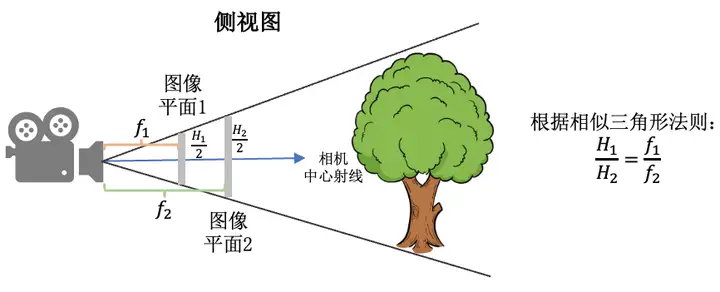
-
Example: CasMVSNet has 3 levels of feature maps, so the first 2 rows of the camera intrinsics are scaled up along with the image size increases:
1
2
for l in reversed(range(self.levels)): intrinsics[:2] *= 2 # 1/4->1/2->1
-
-
Crop a patch doesn’t affect focals referring to GNT
ToTensor
|
|
fov
Code from 3DGS
- Field of view: fovX = $2* arctan(\frac{width}{2f})$
- Near plane’s right boundary: $z_{near} * tan(fovX)$
-
Convert fov to focal
1
2
def fov2focal(fovX, width): # 1111.11103, 800 return width / (2 * math.tan(fov / 2)) -
Near plane computed from fov
1
2
3
4
5
6
7
tanHalfFovY = math.tan((fovY / 2)) tanHalfFovX = math.tan((fovX / 2)) top = tanHalfFovY * znear bottom = -top right = tanHalfFovX * znear left = -right
Pixel Coords
(2024-03-14)
-
np.mgrid. Example from casmvsnet_pl1 2 3xy_ref = np.mgrid[:args.img_wh[1],:args.img_wh[0]][::-1] # (2, args.img_h, args.img_w) # restore depth for (x,y): xyz_ref = np.vstack((xy_ref, np.ones_like(xy_ref[:1]))) * depth_refined[ref_vid] # (3:xyz, h,w) -
np.meshgrid. Example form MVSNet_pytorch1 2 3 4 5xx, yy = np.meshgrid(np.arange(0, width), np.arange(0, height)) print("yy", yy.max(), yy.min()) yy = yy.reshape([-1]) xx = xx.reshape([-1]) X = np.vstack((xx, yy, np.ones_like(xx))) -
torch.meshgrid. Example form MVSNet_pytorch1 2 3 4 5 6y, x = torch.meshgrid([torch.arange(0, height), torch.arange(0, width)]) y, x = y.contiguous(), x.contiguous() y, x = y.view(height * width), x.view(height * width) xyz = torch.stack((x, y, torch.ones_like(x))) # [3, H*W] xyz = torch.unsqueeze(xyz, 0).repeat(batch, 1, 1) # [B, 3, H*W] -
torch.cartesian_prodreferred by Docs1 2 3h, w = ref.shape[:2] vu = torch.cartesian_prod(torch.arange(h), torch.arange(w)) uv = torch.flip(vu, [1]) # (hw,2), As x varies, y is fixed
Write Image
(2024-04-02)
-
Example of cv2 in casmvsnet_pl
1 2 3 4 5 6 7 8 9 10 11 12 13 14 15 16 17import matplotlib.pyplot as plt from PIL import Image # pillow import cv2 import numpy as np root_dir = "/mnt/data2_z/MVSNet_testing/dtu" img_path = f'{root_dir}/scan1/images/00000000.jpg' img = np.array(Image.open(img_path)) # RGB fig, ax = plt.subplots(1,2) ax[0].imshow(img) cv2.imwrite(f'1.png', img[:,:,::-1]) # save ax[1].imshow(cv2.imread(img_path)) # nd array, BGR img_read = cv2.imread(img_path)[:,:, ::-1] # RGB print((img_read == img).all())