auto
-
Compiler will evaluate the expression and use the result’s type.
 1
 2
 3
 4
 5
 6
 7
 8
 9
10
11
12
13
// "auto1.cpp" #include <iostream> #include <typeinfo> using namespace std; int main(){ int a = 1, b = 2; auto s = a + b; // compiler will compute a+b and assign the type of result to s. cout << "Sum = " << sum <<endl; cout << typeid(s).name() << endl; return 0; }Build:
g++ auto1.cpp -o auto1 -
Multiple variables followed by
autoshould be initialized with a common type.1 2 3 4auto i = 0, *p = &i; // pointer variable p stores the address of i, // And the type of i is deduced from the value 0, auto* p = &i; // ok
Reference:
- Codes from The auto Type Specifier in C++ - Neso Academy
- Placeholder type specifiers (since C++11) - cppreference
Vector
(2023-11-10)
|
|
-
std::vectoris a class template (class maker), from which the specific class is derived with additional specifications.-
Template in C++ is like the parent class in Python to some extent: compile-time polymorphism v.s. runtime polymorphsim. But templates are not functions or classes.
-
Specifications follow the template name and are enclosed by angle brackets.
-
-
A
std::vectoris a container for a sequence of objects. -
A
std::vector’s definition doesn’t need number of elements, because it’s a dynamic array with adjustable size, achieved by allocating new memory and copying data as needed. -
Pass a customized type to
std::vector<custom_type>:1 2 3 4 5 6 7 8 9 10 11 12 13 14 15 16 17 18 19 20 21 22 23 24 25 26 27 28 29 30 31 32 33#include <iostream> #include <vector> struct Vertex{ float x,y,z; }; // Overload the << operator for Vertex struct std::ostream& operator<<(std::ostream& stream, const Vertex& v){ stream << v.x << ", " << v.y << ", " << v.z; return stream; } int main(){ std::vector<Vertex> vertices; vertices.push_back({1,2,3}); vertices.push_back({4,5,6}); // Range-based for loop // for (Vertex v : vertices) // will copy each vertex for (const Vertex& v : vertices) // reference won't copy std::cout << v << std::endl; // Delete the 2nd element vertices.erase(vertices.begin() + 1); for (int i=0; i < vertices.size(); i++) std::cout << vertices[i] << std::endl; // Clear the vector vertices.clear(); // size = 0 std::cout << vertices.size() << std::endl; }
Reference:
- The Vector Type in C++ - Youtube - Neso Academy
- Dynamic Arrays in C++ (std::vector) - Youtube - The Cherno
- vector insert() Function in C STL - GeeksforGeeks
Iterator
Ref:
Raw Function Pointer
A representation for a function with an alias. For example,
myFunc(int i) is represented as: void (*alias)(int)
-
A similar thing in Python:
1 2 3 4 5 6norm = torch.nn.LayerNorm myModel = nn.Sequential( nn.Linear(3,5), norm(5) )-
The class name is assigned to a variable, which is an alias (reference). And objects are instantiated later by specifying arguments.
The instantiation is deferred.
-
Funtion pointer stores a function’s address in the compiled binary code.
-
-
In C++, to define a function pointer variable, its type can be deduced by
auto:1 2 3 4 5 6 7 8 9 10#include<iostream> void MyFunc(int a){ std::cout << "Hello" << a << std::endl; } int main(){ auto pFunc = MyFunc; // No (), otherwise calling. pFunc(1); } -
The “Function Pointer” type is
void(*)(args). And a function pointer variable isvoid(*var_name)(args).1 2 3 4int main(){ void(*pFunc)(int) = MyFunc; pFunc(1); }And it can be rewritten as a type by
typedef:1 2 3 4 5int main(){ typedef void(*MyFunc_type)(int); MyFunc_type pFunc = MyFunc; pFunc(1); } -
When passing a function to another function, the function pointer parameter should be defined as
void (*func_name)(args_list):1 2 3 4 5 6 7 8 9 10 11 12 13 14 15 16 17#include <iostream> #include <vector> void PrintInt(int i){ std::cout << i << std::endl; } void ForEach(const std::vector<int>& v, void(*func)(int) ){ # Apply func to each element in the vector for (int i : v) func(i); } int main(){ std::vector<int> myVec = {2,0,2,3}; ForEach(myVec, PrintInt); } -
For compactness, the function
PrintIntcan be written as a one-line (anonymous) lambda function :1 2 3 4 5 6 7 8 9void ForEach(const std::vector<int>& v, void(*func)(int) ){ for (int i : v) func(i); } int main(){ std::vector<int> myVec = {2,0,2,3}; ForEach(myVec, [](int i){std::cout << i << std::endl;} ); }Pass an outside variable
ainto the lambda function:1 2 3 4 5 6 7 8 9 10 11 12 13 14#include <iostream> #include <vector> #include <functional> #include <string> void ForEach(const std::vector<int>& v, const std::function<void(int)>& func){ for (int i : v) func(i); } int main(){ std::vector<int> myVec = {1,3,5,6,0}; std::string a = "Current element:"; ForEach(myVec, [&a](int i){ std::cout << a << i << std::endl;}); }-
[&a]captures the outside variableaby reference without copying data. -
Output
1 2 3 4 5 6 7yi@yi:~/Downloads/Cpp_Study$ g++ function_pointer.cpp yi@yi:~/Downloads/Cpp_Study$ ./a.out Current element:1 Current element:3 Current element:5 Current element:6 Current element:0
-
Ref:
Lambda expression
(2023-11-11)
[](){}:
-
Square brackets
[]is for variables outside the scope of{}lambda function[&]all variables are captures by references.[=]all variables are captured by values.
-
Parentheses
()enclose parameter to be used in{}lambda function -
Curly braces
{}enclose operations.
Usage:
- If there is a function pointer, lambda function can be in place of it.
Example using lambda expression as a bool:
|
|
-
std::find_ifexaminsmyVecto find the fisrt element that is larger than 3 and returns an iteratorit. -
Iterator object
itis the address of the first element in the container. Andit+1points to the 2nd element.So,
itneeds to be dereferenced to get the value.
Ref:
- Lambdas in C++ - The Cherno
- Lambda expressions - cppreference
- std::find, std::find_if, std::find_if_not - cppreference.com
std::function
(2023-11-11)
A representation for a kind of callable objects, such as normal function, functor, lambda expression, struct.
-
“Same kind” refers to having the same return type and input arguments, as indicated by the function signature.
1 2 3 4 5 6 7 8 9// Normal function can be represented as a std::function: void MyFunc(int x){ std::cout << x << std::endl; }; std::function<void(int)> f = MyFunc; // Lambda expression is assigned to a variable: std::function<void(int)> fl = [](int i){std::cout << i << std::endl;}; // Equivalent to a function pointer: auto pf = [](int i){std::cout << i << std::endl;}; -
The
std::function<void(int)>represents any callable object that has no return value and only oneintinput argument.Therefore, it can be used as the type for a formal parameter when defining a function that takes as input a specific kind of function.
1 2 3 4 5 6 7 8 9 10#include <iostream> #include <functional> void funcsPrintNum(int x, std::function<void(int)> func){ func(x); } int main(){ auto myLambda = [](int i){ std::cout << i << std::endl; }; funcsPrintNum(1, myLambda); } -
A vector storing multiple callable objects that have an identical function signature.
1 2 3 4 5 6 7 8 9 10 11 12 13#include <iostream> #include <functional> #include <vector> void aNormalFunc(int i){ std::cout << i + 5 << std::endl;} int main(){ std::vector<std::function<void(int)>> vf; vf.push_back([m=5](int i){std::cout << m << i << std::endl;}); vf.push_back(aNormalFunc); vf[0](1); // Call the 1st function with the argument 1 vf[1](4); // Call the 2nd function }-
Output
1 251 9
-
-
Calling a function from a
std::functionis slower than calling it natively. This is the cost of unifying representation for callable objects with the same input and output.
Ref:
Template
(2023-11-14)
-
The template argument
typename T(a type) will be deduced when compiling and the corresponding function will be created to link.1 2 3 4 5 6 7 8 9 10 11 12#include <iostream> #include <string> template <typename T> // before the return type of the func void Print(T value){ std::cout << value << std::endl; } int main(){ Print(5); Print(5.5f); Print("A string"); }-
When calling a template in program, the teamplate argument
<T>can be omitted as it can be deduced by compiler. -
Output
1 2 35 5.5 A string
-
-
The following
int Nis required at compile time, because an array created on stack needs size known when compiling. And it can be deduced when evaluating the template:1 2 3 4 5 6 7 8 9 10 11 12template <typename T, int N> class ArrayClass{ private: // visible inside the class T m_Array[N]; public: // visible outside the class int GetSize() const {return N;} }; int main(){ ArrayClass<int, 5> myArray; std::cout << myArray.GetSize() << std::endl; }
Ref:
Class vs Struct
“Struct is the same as class.” – CLASSES vs STRUCTS in C++ - YouTube - The Cherno
Default members (without setting visibility) of a class are all private.
In contrast, members in a struct are all public by default.
-
Struct also can set members (variables and methods) to private.
-
Struct can do inheritance as well, but not common. Struct is often used to group variables.
doubt: Why does a struct can include itself?
(2024-01-27) Not itself.
fromChunk is a function and its return type is the stuct.
The code is from 3DGS.
|
|
Bitwise Operator
(2023-11-14)
-
~1 2 3 4 5 6 7 8 9#include <iostream> #include <bitset> int main(){ std::size_t alignment = 128; std::cout << std::bitset<32>(alignment) << std::endl; std::cout << std::bitset<32>(alignment-1) << std::endl; std::cout << std::bitset<32>( ~ (alignment-1)) << std::endl; }Output:
1 2 300000000000000000000000010000000 00000000000000000000000001111111 11111111111111111111111110000000Ref:
#define
(2023-11-15)
-
Short for a for loop
1 2 3 4 5#define fori(x) for(int i=0; i<x; i++) fori(20){ ... } -
#define 100_000won’t work.#define 100000is ok.
Header files
(2023-11-15)
-
Functions’ signature must be written in the file to use them.
Those declarations can be stored in header files.
-
The preprocess directive
#includewill copy and paste a header file to there. -
Header files can form a chain, whereas a potential probelm is repeated difinations. (e.g. structs need unique names.)
-
The header guide
#pragma oncemarks a header file won’t be included multiple times into a single translation unit (cpp file). -
Old fasion is wrapping the entire header file with
#ifndef symboland#endif(2024-06-03)
-
1 2 3 4 5 6 7 8//x.h #ifndef __X_H_INCLUDED__ // if x.h hasn't been included yet... #define __X_H_INCLUDED__ // #define this so the compiler knows it has been included class X { }; #endif
-
-
-
Suffix
.his used to differentiate “C standard library” (<stdio.h>) and “C++ standard libray” (<iostream>) -
Angular brackets
<fname>will search the “standard include directories” (of compiler) for the file namedfname.While double qutoes
"../myHeader.h"normaly enclose a relative path, although it can enclose a file that resides in “standard include directories” as well (e.g.,"iostream").
- Do not use namespace in a header file. Why I don’t “using namespace std” - The Cherno
Ref:
(2024-05-13)
Ref: C/C++头文件里有什么, 什么是接口与实现分离, 为什么这么干? 代码知识 - 不停感叹的老林
- 头文件的意义:多处声明,一处定义
(2024-06-03)
Ref: Headers and Includes: Why and How - C++ Articles - Disch (Found by DDG)
-
Since each source file is compiled individually to object files (which are binary too) before linking them together, the header files are needed to make the function interface recognizable for the compiler, and keep the implementation individual.
-
Keeping each file self-contained facilitates making modifications.
-
As each source file is compiled separately, the implementation of a function is unknown in another source file. So the header file is a “messenger” between them by telling funcitons’ interface to each other.
Thus, functions’ interface and their implementation are separated.
-
Spliting the program to multiple piece files instead of a single comprehensive file helps debugging and facilitate compilation (only compile the needed file).
-
-
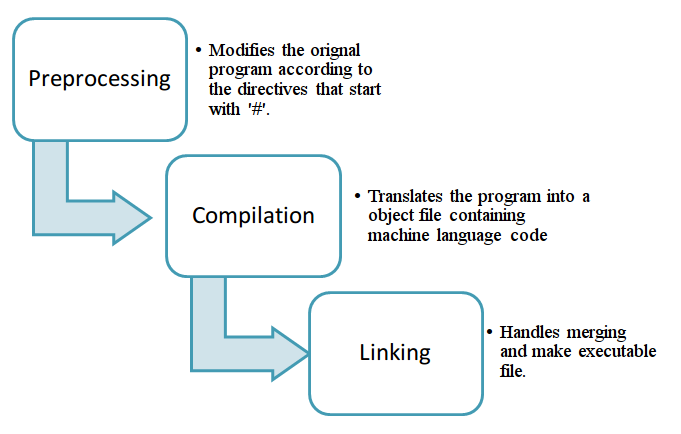
The compiler compiles (translate) each source file into a binary (object file), and the linker finds function implementations, and connects the object files and precompiled libraries together. 0.5 — Introduction to the compiler, linker, and libraries
-
-
#includeis copy & paste during preprocessing.- Header files are pasted (#included) and not compiled, whereas source files are compiled and not included.
-
Do not #include source files.
Only #include the necessary things in header files.
-
Try to avoid #include the full .h file:
Do nothing ❮ Forward declare A ❮ #include “a.h”
-
Forward declared dependencies:
class aClass; -
The right way to include: “Forward declare when you can, don’t #include unless it’s necessary”
-
-
Use a pointer or reference to an object
aClass* a, instead of instantiating a full object:aClass a, and then use forward declaration:class aClass;to avoid the circular inclusion problem where using#include "a.h"is necessary. -
inline functions require their function body to exist in the every cpp file that calls them.
Their function bodies can be put in a header file.
-
The forward declaration for a template class requires
typedef, which could cause inconvenience as all files that use the template class need to be modified manually when the template class changes.The solution is putting the typedef of the template class in a header file and then #include it in another header file.
(2024-06-04)
Ref: How a compiler knows from a header file, that a source file exists somewhere? - SO (Found in DDG)
-
#include "myfile.h"has abroadersearching scope than#include <stdio.h>The
""will search in the current working folder besides the predefined standard well-known directories. -
Including a header
#include math.hbut without linking the librarylibm.ainto the executable binary, by specifying it in thegccbuild command:-lm, the functions inlibm.acan’t be called- Gcc convention: For a precompiled library:
lib<name>.a, the argument to link it:-l<name>.
- Gcc convention: For a precompiled library:
-
-Iand-Lspecify the additional searching paths to headers and libraries.
Ref: C/C++ Headers and Source Files: How Do They Work? - codeproject (Not accurate enough)
-
Everything (function, struct, variable) in cpp needs a declaration before using it, so header files are pasted in the source file with
#include.- Header files are declarations informing the compiler.
-
Semicolon after the function signature indicates to the compiler that this is a function prototype declaration, rather than the definition.
-
Compilation only process source files, as header files already have been pasted into source files.
Compiling & Linking
Compiling:
-
Convert cpp files (translation units) to binary object file.
-
Preprocess statements (directives) will be done when compiling.
#includejust copy and paste to where it is.#definereplace symbol#if 1(or 0) and#endifto use a code snippest or not.
Once all preprocess statements are finished, the preprocessed “full” code will be tranformed to an object file
-
Multiple cpp files can be combined into a single cpp file by
#include, and then only one translation unit will be generated.However, if every cpp file doesn’t include others, each cpp file will have an translation unit.
Each translation unit yields a object file
-
constant folding: constant arithmetics will be solved at compile time, such that there is only 1 asm instruction: put a number into a register.
Ref: How the C++ Compiler Works
Linking:
-
Find the binary code of functions, symbols and entry point
main, according to their “function signatures”, and then form a executable file.- Compiling is to preprocess and generate object file.
- Linking is organizing binary code to a executable fiel.
- Build = Compiling + Linking
-
Link error and compile error
Error code starts with “LNK” means it’s an linking error:
-
Function signature mismatch with the definition (name, return type, parameters), thus the binary code can’t be found:
LNK2019 Unresolve externel symbol -
No entry point definition (e.g.,
main()) for Application(.exe). -
Duplicate symbols (function signature, variables) are found in the project’s obj files.
LNK1169 One or more funcname defined symbols found -
Even if a function isn’t called by
main(), it could be called in other cpp files.Therefore, linker also needs to link those “uncalled” functions, unless it has
statickeysword representing it will only be called internally in the cpp file it exists.
Error code starts with “C” means it’s an compiling error:
- Syntax errors, e.g., missing
;(C2143) - No declaration or definition for functions used in a cpp file.
- Multiple definitions in a single file.
-
-
Multiple definition if a function is defined in a header file without
staticorinlinelimitation, because#includeis just pasting header file.“Log.h”:
1 2 3 4 5#pragma once #include <iostream> void Log(const char* x){ std::cout << x << std::endl; }“Log.cpp”
1 2 3 4#include "Log.h" // Log definition will be here void InitLog(){ Log("Initialization"); }“main.cpp”
1 2 3 4 5 6 7 8#include "Log.h" // Log definition will be here int Multiply(int& a, int& b){ Log("Multiplication:"); return a*b; } int main(){ int c = Multiply(5, 2); }There won’t be compiling error, since each cpp file knows functions to be used. But this project cannot be linked since there two
Logfunction with the same signature, and the linker don’t know which one should be used.There are 3 soulutions:
-
staticwill limit the function used only in the file it resides in and won’t be visible to any other obj files.1 2 3static void Log(const char* x){ std::cout << x << std::endl; }That means even though “Log.cpp” and “main.cpp” both have the definition of
void Log(const char*), they use their ownLog. The linker won’t be confused. -
inlinewill replace the calls of the function with its body:1 2 3inline void Log(const char* x){ std::cout << x << std::endl; } -
Define the function in one of translation units. And header file only contain declarations.
Move the definition into “Log.cpp”:
1 2 3void Log(const char* x){ std::cout << x << std::endl; }
-
Ref: How the C++ Linker Works - The Cherno
(2024-06-04)
How C++ Works: Understanding Compilation | Toptal (Found in DDG)
-
Preprocess: Copy/paste header files to source files:
“test-compile.cpp”
1 2 3#include <iostream> int main(int argc, char* argv[] ){ std::cout << "Hello" << std::endl;}Add
-Eoption to stop the compiler after preprocessing: (Found by perplexity)1 2gcc -E test-compile.cpp -o test-compile.ii wc test-compile.ii- The preprocessing and compiling in c++ is similar to c lang.
-
Compile each source file separately to generate a object file: (sec2)
Given a c file: “sum.c”:
1 2int sumI(int a, int b){ return a+b;} float sumF(float a, float b){return a+b;}-
-cstops the compiler after compiling before linking. manual (SO)1yi@Alien:~/Downloads/Cpp_Study$ gcc -c test_compile.cpp -o sum.o -
nmlists symbols from object files.1 2 3yi@Alien:~/Downloads/Cpp_Study$ nm sum.o 0000000000000018 T _Z4sumFff 0000000000000000 T _Z4sumIii-
No symbol is imported. Two symbols are exported as part of the .text segment
T. (Don’t understand) -
_Z4sumFffand_Z4sumIiiare the names used by other source files calling the 2 functions.
-
-
#include header files is declaring the 2 functions
-
-
Mix calling C and C++ functions
- Function symbols in cpp enable the feature of overload when several functions have the same name but different input arguments.
-
Link all the object files to generte a binary file.
(2024-06-06)
-
Compile 的中文翻译:编译 = 翻译 + 编纂。编纂的意思是把多个文件放到一起。
pile 是“一摞”, compile 是把一摞文件放到一起。
Find Next MSB
(2023-11-17)
Find the next-highest bit of the MSB (Most Significant Bit)
-
Right shift:
1 2 3 4 5 6 7#include <iostream> #include <bitset> int main(){ uint16_t x = 32767; // 01111111_11111111 std::cout << (x >> 16) << std::endl; // 0 std::cout << (x >> 12) << std::endl; // 0000000_0000111 }
Parse Args
(2023-11-03)
|
|
Scope Resolution
(2024-02-01)
-
::: Scope resolution operator in C++ - GeeksforGeeks- Differentiate global and locatl variables with the same name;
- Identify classes with the same name in different namespace.
- Define a member function outside the class
- Access a class’s static member
- Distinguish members with the same name reside in multiple classes with inheritances.
- Refer to nesting class.
-
.is used for member of object. Member access operators - cppreference -
a->b, whereais a pointer, equals to ((*a).b). In contrast,a.bwhereais an object. member access operators - C++ Forum
Type Casting
(2024-02-03)
-
(uint32_t)is forceful casting in terms of the bits reading. whereasstatic_cast<uint32_t>cannot be applied on data with bits interpretion mismatched. Type conversions and type safety - Microsoft Learn1 2 3 4 5 6 7#include <iostream> int main(){ float depth = 15.7; std::cout << (uint32_t)depth; // 15 std::cout << static_cast<uint32_t>(depth); // 15 std::cout << reinterpret_cast<uint32_t>(depth); //error }