From C to CUDA
Source article: CUDA 01 | 第一个程序 - Master KangKang的文章 - 知乎
CUDA extends Cpp to GPU.
-
C lang: “add.c”
1 2 3 4 5 6 7 8 9 10 11 12#include<stdio.h> int add(int a, int b){ int c = a + b; return c; } int main(){ int c = add(2, 3); printf("c = %d\n", c); return 0; } -
CUDA: “add.cu”
1 2 3 4 5 6 7 8 9 10 11 12 13 14 15 16 17 18 19 20 21 22 23 24#include<stdio.h> __global__ void add(int a, int b, int *c){ *c = a + b; } int main(){ int c; // Allocate Unified Memory - accessible from CPU or GPU int* c_cuda; // a memory for a int data cudaMalloc((void**)&c_cuda, 1*sizeof(int)); //return pointer // Launch kernel on 1 block containing 1 thread add<<<1,1>>>(2, 3, c_cuda); // Transfer data between GPU VRAM and CPU RAM cudaMemcpy(&c, c_cuda, sizeof(int), cudaMemcpyDeviceToHost); printf("c=%d\n", c); // Free the allocated unified memory cudaFree(c_cuda); return 0; } -
Adapt C to CUDA (kernel function):
-
The function
addis declared as a__global__function, and then it becomes a kernel, which is called from CPU and executed on GPU. -
Kernels have no return value, as results are left in memory.
- Thus, the GPU memory for output data must be allocated (by
cudamalloc) and passed into the kernel. - And free it (with
cudaFree) at the end.
- Thus, the GPU memory for output data must be allocated (by
-
A kernel needs execution configuration:
<<<blocks, threads, shared_mem, stream>>>to sequentialize the host code before host compilation. Docs
-
-
Compile
1
2
3
4
5
6
7
8
# For C project gcc add.c -o add_c # For CUDA project nvcc add.cu -o add_cuda # Profiler nvprof ./add_cuda
Blocks & Threads
-
CUDA locates a thread via blocks.
-
Number of threads in a block is a multiple of 32, e.g., 256 threads. An Even Easier Introduction to CUDA - Nvidia Blog - Mark Harris, Jan25, 2017
-
Total threads can be reshaped to 2D or 3D, and accordingly the kernel needs to modify the threads indexing.
-
Number of blocks must be larger than the total elements.
Given N elements, there needs n = (N + blkDim.x - 1)/blkDim.x
-
Index of a thread is
blockIdx.x * blockDim.x + threadIdx.x.And a grid includes all the threads =
gridDim.x * blockDim.x. (grdiDim in the following figure may be wrong.)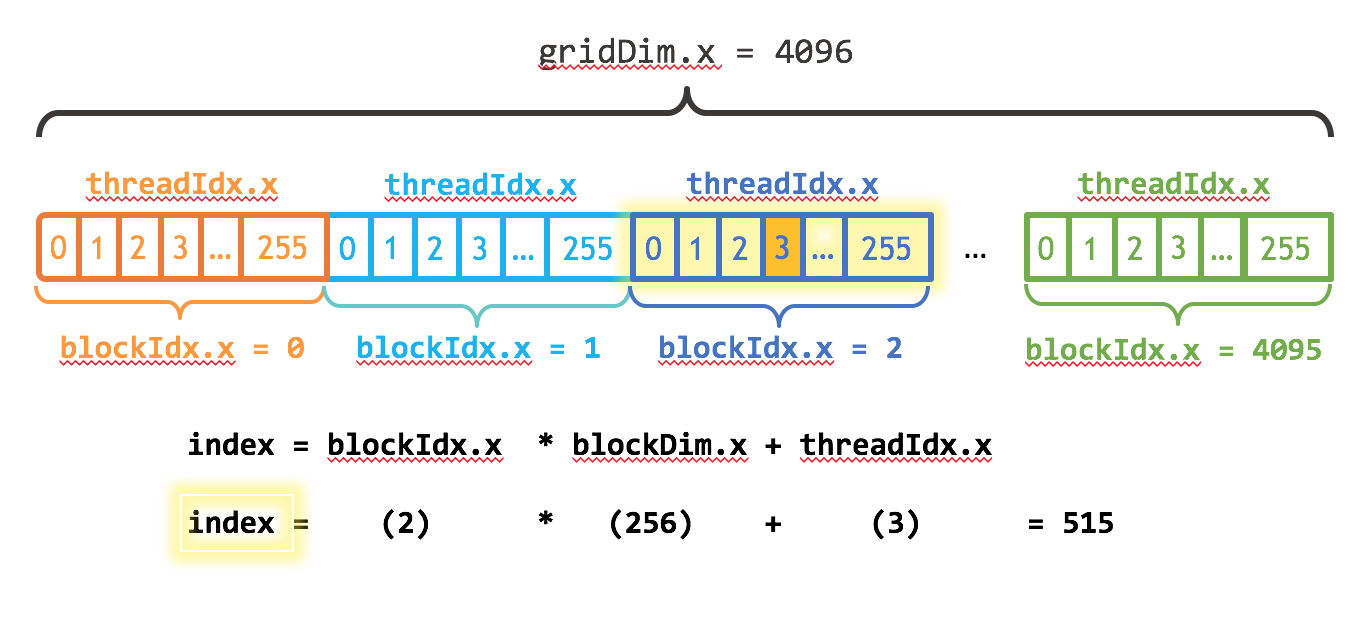
Ref
-
Tutorial 01: Say Hello to CUDA - CUDA Tutorial - Read the Docs
-
Triple chevrons: How is the CUDA«<…»>() kernel launch syntax implemented - SO
Example
Source article: An Easy Introduction to CUDA C and C++ - Nvidia Blog - Mark Harris, Oct31, 2012
- Each thread handles a single element in an array.
Glossary
-
SM: Streaming Multiprocessor Docs
-
dim3: An integer vector based on uint3. Programming Guide
To do
Getting Started With CUDA for Python Programmers
cudaMemcpy
(2024-02-02)
Doc: NVIDIA CUDA Library | Example from 3DGS
Specify dest and src pointers, number of bytes to be transferred, and direction of copy.
|
|
Shared Memory
(2024-02-05)
- Shared by threads within a thread block.
Synchronization
-
__syncthreadsis a “checkpoint” to wait all thread arrive at this point.